Export a Claude Chat to Markdown (.md): Free and Bulk Ways
 By Aarohan Niraula7 min read
Export a Claude chat to Markdown for Obsidian or Notion: free one-click routes, Claude's own JSON export, and every chat in a project as .md files at once.
To export a Claude chat to Markdown, you need a small free tool, because Claude has no download button for a single conversation. For one reply, the Copy button under it gives you the reply's Markdown. For a whole chat, a free open-source bookmarklet saves it as a .md file in one click. For a chat together with its files, every chat in a project, or a set of chats at once, use a browser extension such as Claude Project Downloader.
Everything here works on your own chats, the ones you can already open on claude.ai. Claude's menus and each tool's features were checked against Anthropic's help pages and the tools' own pages on 9 November 2026.
Can you export a Claude chat to Markdown in Claude itself?
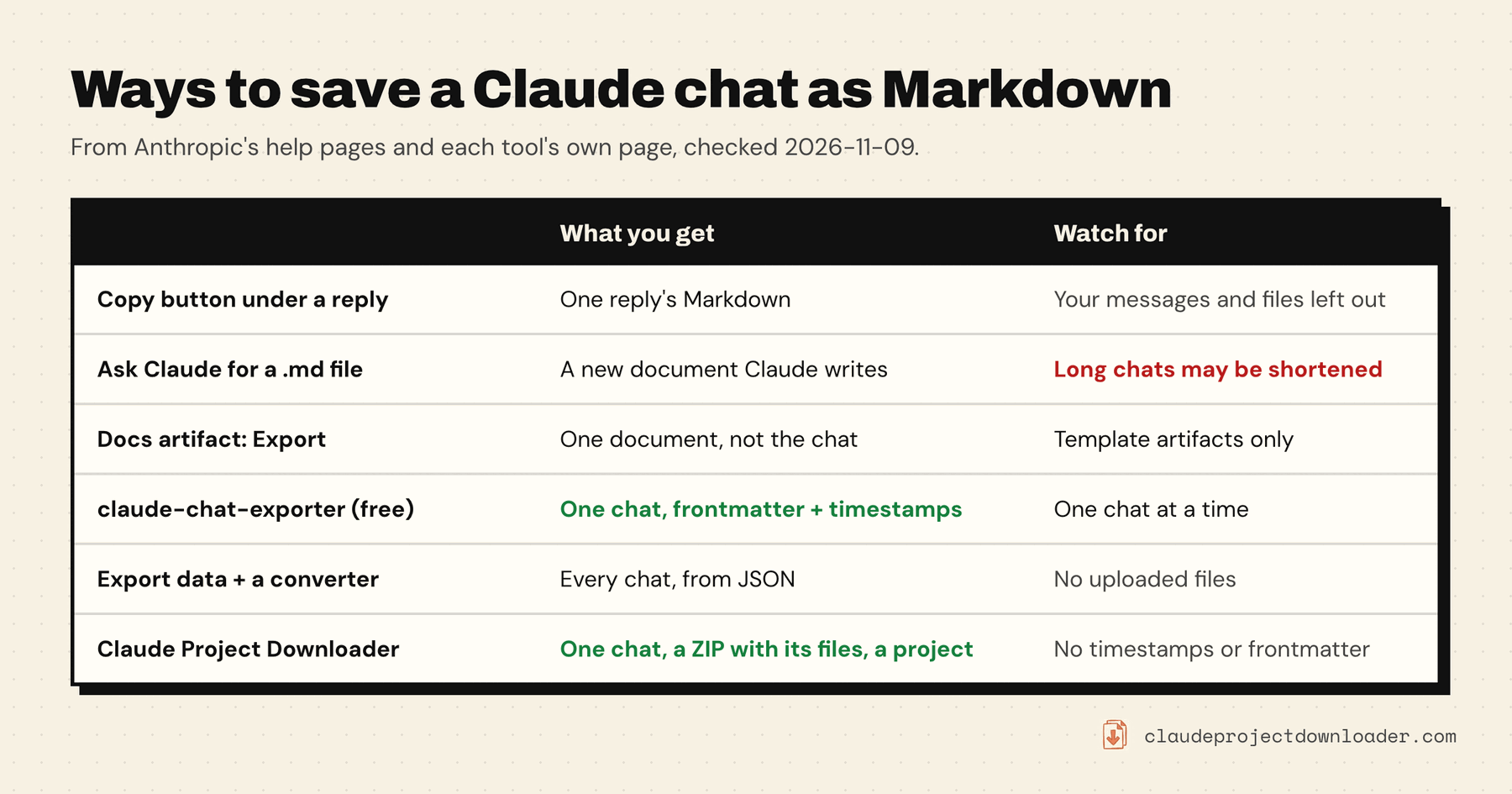
Not as a file. Claude writes its replies in Markdown, so the text is already in the right shape, but the app has no button that saves a conversation as a .md file. These are the built-in options, and what each one leaves out.
The Copy button. Under each Claude reply there's a Copy button. It copies the reply with its Markdown intact: headings, lists, tables and code fences. Paste it into any editor and save it as .md. That's enough for one useful answer. For a whole chat it's slow, and it skips your own messages and any files.
Export data. Anthropic's only real export is Settings → Privacy → Export data. Per Anthropic's export guide, updated this week, it covers your chats, projects, memory and account data, but not the original files you uploaded. You get it as an email link that expires 24 hours after it's created and may only work once, so download it straight away. The files inside are JSON, not Markdown, and you can't pick one chat. It can't be started from the iOS or Android app. On Team and Enterprise plans an owner has to allow member exports first.
A Docs artifact's Export button. If what you want to keep is a document Claude made for you, such as a report or a plan, that's an artifact, not the chat. Anthropic's artifacts guide says docs made from a template export to Word, PDF, Markdown and Google Docs. How to download Claude artifacts covers older artifacts too.
Ask Claude to write a .md file. With Create and edit files turned on under Settings → Capabilities (called Code execution and file creation in the older settings layout), you can ask Claude to put the conversation into a Markdown file you can download. The catch is that Claude rebuilds the text from what it can still see. In a long chat it may shorten or leave out parts, so treat the result as a summary, not a transcript. If the file's Download button errors, see why Claude failed to download files.
Save one Claude chat as a Markdown file for free
For a single conversation, a free tool does the job in one click and costs nothing.
claude-chat-exporter (bookmarklet). The open-source claude-chat-exporter is MIT-licensed and was last updated in October 2026. Its README describes the setup:
- Open its install page and drag the Claude Export button to your bookmarks bar.
- Open one of your chats on claude.ai.
- Click the bookmark. A
.mdfile named after the chat downloads.
The file opens with YAML frontmatter (title, source, model, export date), then one heading per turn with a timestamp. Tables, code and the files Claude created come through as code blocks, and uploaded images are embedded, documents linked and text files inlined. It exports the branch you're looking at, so if you regenerated a reply, switch to the version you want first. It reads the chat through Claude's own API with your session and has no server of its own. That also means it can read your chats, so look at the code before you run it, as with any extension.
AI Chat Exporter (Chrome extension). Its Chrome Web Store listing (v3.10.1, updated 19 October 2026) says Markdown exports are free and unlimited, need no account, and are made in your browser. You can pick which messages to include, and images can be embedded in the Markdown. Only its PDF export is limited and goes through its server.
In Firefox. Claude to Markdown is a Firefox add-on built on Simon Willison's converter. It shows the chat you loaded last as Markdown, and its README says to reload the Claude tab before exporting. It was last updated in March 2025, so expect rough edges.
If you only ever save one chat at a time, stop here. One of these covers it.
Turn Claude's data export into Markdown files
To get every chat as Markdown for free, start from Anthropic's export and convert it.
- Request the export from Settings → Privacy → Export data and download the ZIP from the email.
- Unzip it. Your chats are in the JSON files inside.
- Run a converter. claude_desktop_export_browser is a small Python tool that reads the unzipped export, lets you browse your chats in a terminal, and saves the ones you pick as Markdown and JSON, with timestamps.
Two limits. The export doesn't include the files you uploaded, so a converted chat has no attachments. And Anthropic doesn't document the export's format, so a converter can break when it changes. Check a few files against the chats before you delete anything.
If you're comfortable in a terminal, you can skip the email altogether. The open-source claude-backup fetches every chat your account can open as JSON, and its companion claude2md turns those files into Markdown. The backup guide covers it.
Export a chat with its files, a project, or many chats at once
The free tools export Claude chats to Markdown one at a time, or all of them without their files. If you need a chat's attachments next to its transcript, or every chat in a project as Markdown, Claude Project Downloader does that from inside claude.ai.
- One chat: click Download next to Share on the chat page and pick Markdown (.md) for the transcript alone, or ZIP with attachments for the Markdown plus your uploads and the files Claude created. Tick Remember my choice to make it one click next time.
- Every chat in a project: on the project page, open the side panel, set Project Chat Export Format to Markdown under Export settings, and click Download All Chats. You get one ZIP with a
.mdfile per chat. Download Entire Project adds the project's instructions and knowledge files to the same ZIP. - Chats from different projects or folders: select them in the extension's Library and choose Export → ZIP of Markdown files.
- Everything, on a schedule: with Pro, Back up everything saves every project and chat in one ZIP, on demand or daily or weekly. See how to back up Claude projects and chats.
On the free plan, each chat exported from the Library counts as one of your 5 downloads a day, and a whole project's chats use your one free bulk export. Pro removes both limits.
What the Markdown file looks like
Each chat becomes one plain Markdown file. The chat's title is the top heading. Below it, every message gets its own second-level heading, Human or Assistant, followed by the message text with Claude's headings, lists, tables and code blocks as Claude wrote them. Files you attached show up as a line such as [attachment: brief.pdf] under your message.
What to know before you rely on it:
- Files Claude wrote out appear in full as fenced code blocks, and a short marker shows where Claude used a tool, such as web search.
- Uploads are named, not included, in a plain
.mdfile. Choose the ZIP if you need the files themselves. - No timestamps and no YAML frontmatter. If you want Obsidian properties filled in for you, the bookmarklet adds them.
- Claude's thinking is left out.
- Every version is kept. The export reads the whole conversation, so if you edited a message or regenerated a reply, the earlier versions can appear in the file too.
Open your exported chats in Obsidian or Notion
Obsidian. An Obsidian vault is just a folder of Markdown files, per Obsidian's help. Copy the .md files, or the unzipped export folder, into your vault and they show up straight away. Frontmatter from the bookmarklet turns into note properties. Keep a ZIP's attachments folder next to its transcript so the files stay together.
Notion. Use Import → Text & Markdown. Notion's import guide says you can import several Markdown files in one go, and a ZIP goes through its own ZIP import. Very large ZIPs can fail, so import a big project in batches.
Claude Desktop and Claude Code chats
Chats in the Claude Desktop app are the same chats you see on claude.ai, so open them in Chrome and use any route above. Anthropic's Export data also works from Claude Desktop.
Claude Code is different. In the terminal, its /export command saves the current conversation as plain text (Claude Code commands). How to export a Claude Code conversation covers older sessions, sessions on claude.ai/code, and free tools that turn them into Markdown.
If you'd rather have a printable document than a text file, how to export a Claude chat to PDF starts from the same Markdown.
Frequently asked questions
How do I download a Claude chat as an .md file?
Claude has no button for it. The quickest free way is the open-source claude-chat-exporter bookmarklet: drag it to your bookmarks bar, open the chat and click it, and a .md file downloads. Extensions such as AI Chat Exporter or Claude Project Downloader add a download option on the chat page instead.
Does Claude have a built-in Markdown export?
Not for chats. The Copy button under a reply copies it as Markdown, one reply at a time. Docs artifacts made from a template have an Export button that includes Markdown, but that saves the document, not the conversation. Settings, Privacy, Export data gives your whole account as JSON.
Can I export a Claude chat to Markdown in Firefox?
Yes. The claude-chat-exporter bookmarklet lists Firefox, Safari, Chrome and Edge as supported, and the Claude to Markdown add-on is made for Firefox. Claude Project Downloader is a Chrome extension, so in Firefox use one of those instead.
How do I export all my Claude chats to Markdown?
For free, request Settings, Privacy, Export data and run a converter on the JSON, or use the open-source claude-backup and claude2md tools from a terminal. Anthropic's export leaves out your uploaded files. Claude Project Downloader exports a project's chats as a ZIP of Markdown files, and its Pro plan backs up every project and chat.
Does a Markdown export include images and attachments?
It depends on the tool. The bookmarklet embeds uploaded images and links documents. AI Chat Exporter can embed images. Claude Project Downloader names uploads in the .md file and saves the files themselves when you pick ZIP with attachments. Anthropic's data export doesn't include uploaded files at all.