Export a Claude Code Conversation: Terminal, IDE and Web
Export a Claude Code conversation with /export, from VS Code or from claude.ai/code, and save old sessions before Claude Code deletes them after 30 days.
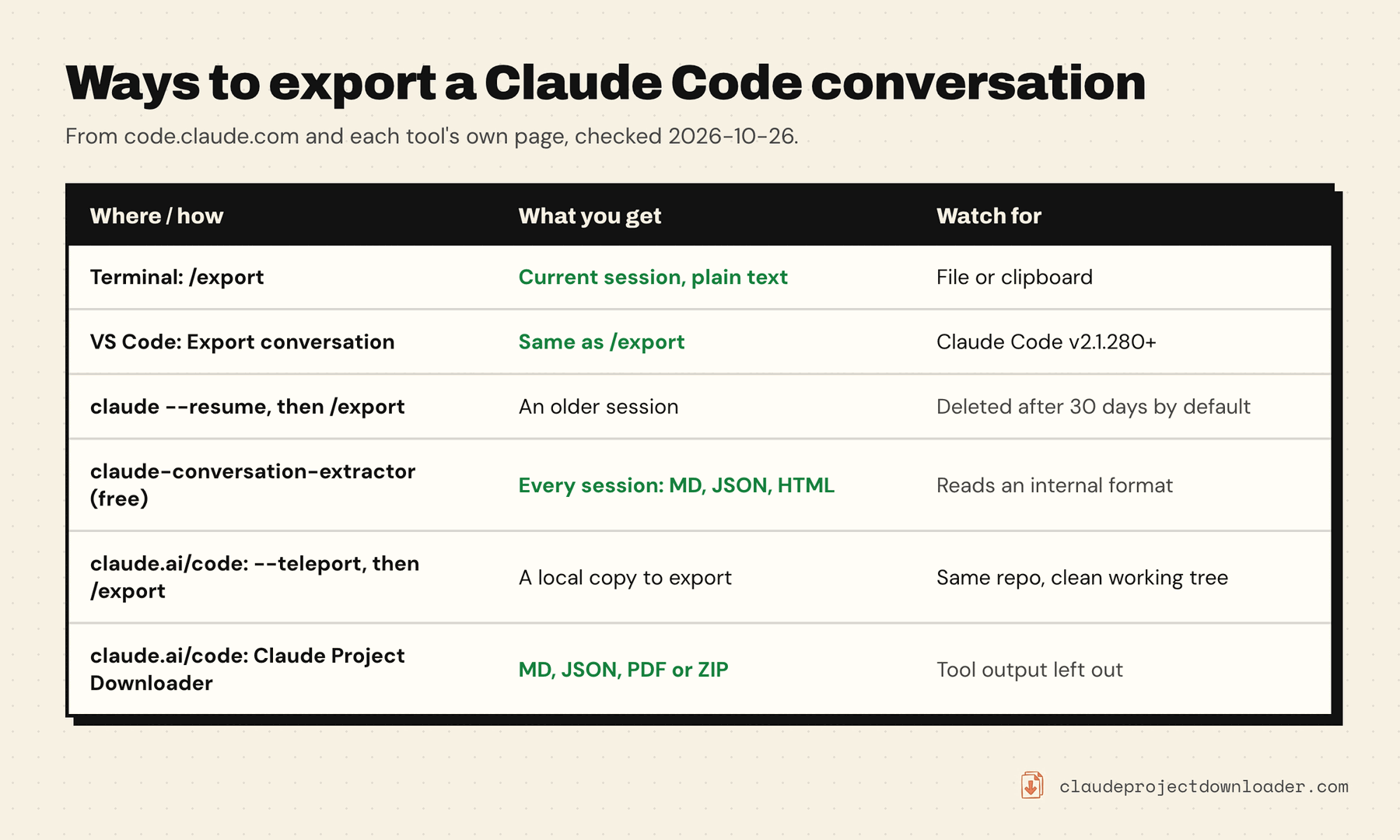
To export a Claude Code conversation from the terminal, type /export in the session and choose to copy it or save it as a file. /export notes.txt skips the menu and writes the file straight away. In the VS Code extension the same command sits under Export conversation. Sessions you run on the web at claude.ai/code have no export command of their own, so you either pull them into your terminal or use a browser extension.
One thing to know before you need it: Claude Code deletes local session transcripts after 30 days by default, without a message. If a conversation matters, export it now or raise the limit (see below). Everything here works on your own sessions, the ones you can already open. Commands and defaults were checked against Anthropic's Claude Code docs on 26 October 2026.
Where your Claude Code conversations are saved
Claude Code isn't claude.ai chat, so the usual ways to export Claude chats don't reach it. Where a session lives depends on where you ran it.
- Terminal, VS Code, JetBrains and the desktop app's local sessions are saved on your computer. Per Anthropic's session docs, each one is a JSONL file at
~/.claude/projects/<project>/<session-id>.jsonl, where<project>is your working folder's path with every character that isn't a letter or digit turned into a dash. The terminal and the VS Code extension share this history. - Cloud sessions that you start at claude.ai/code, from the Claude app, or with
--cloudrun on Anthropic's machines. Anthropic stores those transcripts so you can come back to them in the claude.ai/code sidebar.
Anthropic's account-wide Export data (Settings → Privacy) sends your claude.ai conversations as JSON. Its help page doesn't say it includes Claude Code sessions, so don't count on it for them.
How to export a Claude Code conversation in the terminal
/export is built in and free. It exports the session you're in.
- Finish or pause the session you want to keep. Don't
/clearfirst, because that starts a new conversation. - Type
/exportand press Enter. - Pick Copy to clipboard or Save to file.
- To skip the menu, give a file name:
/export auth-refactor.md. The text is plain, so any extension works..mdopens nicely in Markdown editors.
You get a readable transcript: your prompts, Claude's replies, and tool outputs rendered as readable text, as the sessions guide describes it. It's meant for people to read, not for scripts.
Two related commands help:
/copycopies only Claude's last reply./copy 2takes the one before it, and when the reply has code blocks you can pick a single block./renamegives the session a name, so it's easy to find in the resume list later.
In VS Code
Open the Claude Code panel and select Export conversation in the Context section, or type /export in the prompt box. It copies the conversation as plain text or saves it to a file. Anthropic's VS Code guide says this needs Claude Code v2.1.280 or later, so update the extension if you don't see it.
Export an older session
/export only works inside a session, so reopen the old one first:
claude --continuereopens the most recent session in the current folder.claude --resumeopens a picker of past sessions. It shows sessions from the current folder by default. Press Ctrl + A to list every project on the machine.claude --resume <name>jumps straight to a session you named with/rename.
Once it's open, run /export. This only works while the transcript is still on disk, which brings us to the 30-day limit.
Save Claude Code sessions before they're deleted
Claude Code runs a cleanup sweep that deletes transcripts older than cleanupPeriodDays. The default is 30 days, and per the settings reference it deletes them without showing a message. An old session simply stops appearing in /resume, and you can't export it any more. If you might want to export Claude Code conversation history from last month, raise the limit now.
To keep sessions longer, add this key to ~/.claude/settings.json:
{
  "cleanupPeriodDays": 365
}
The minimum is 1, and 0 is rejected. Use a large number if you never want them swept. Sessions you started or last continued in the Claude desktop app or Cowork are an exception: Claude Code keeps those at any age unless you set desktopSessionCleanupPeriodDays.
Two cautions before you keep or share transcripts:
- They're plain text. Anthropic's
.claudedirectory docs note that transcripts aren't encrypted. If Claude read a.envfile or a command printed a token, that value is in the transcript, and in any export of it. Check an export before you paste it into a ticket or a chat. - The raw format isn't stable. You can back up the whole
~/.claude/projectsfolder, and it works as a copy. Anthropic says the JSONL entry format is internal and changes between versions, so a script that parses it can break after an update.
Export every Claude Code session at once
/export handles one session at a time. To export Claude Code conversation history in bulk, use a free open-source tool that reads ~/.claude/projects for you.
- claude-conversation-extractor (Python, MIT, v1.1.2 on PyPI as of October 2026). Install it with
pipx install claude-conversation-extractor, thenclaude-extract --allexports every session. Markdown is the default;--format jsonand--format htmlare also there.--detailedadds tool calls and their output. It also has a search across all your sessions. - cctrace (Python). It exports a session to Markdown and XML along with the raw JSONL. Version 2 can also write a portable copy into your repository that someone else can import and continue.
Both read Claude Code's internal format, so the warning above applies: if one breaks after a Claude Code update, check its issues page for a fix. If you script your own, Anthropic suggests a SessionEnd hook, which receives the transcript's path when a session ends, so you can copy it somewhere safe.
Export Claude Code sessions from claude.ai/code
Cloud sessions live on claude.ai/code, not on your disk, so /export and the tools above can't see them. Claude Code on the web has no download button either. You have three options.
Teleport the session to your terminal. From a checkout of the same repository, run claude --teleport and pick the session. Anthropic's Claude Code on the web guide says this loads the full conversation into your terminal as a local copy. Run /export there. Teleport needs a clean working tree (it offers to stash your changes) and the session's branch pushed to the remote.
Share it instead of exporting. If the goal is to show someone the session, change its visibility. Pro and Max offer Private or Public, which means any signed-in claude.ai user with the link. Team and Enterprise offer Private or Team. Sessions can contain code and credentials from private repositories, so check before you share.
Use a browser extension. Claude Project Downloader (v1.21 and later) adds a Download icon next to Share on claude.ai/code sessions. It offers the same choices as a chat:
- Markdown: your prompts and Claude's replies, with files Claude wrote shown in full as code blocks and a short marker such as [Claude used Bash] where it ran a tool.
- PDF: the same conversation laid out as a document through Chrome's Save as PDF. The Claude chat to PDF guide shows what's in it.
- JSON: the conversation data, for scripts.
- ZIP: the Markdown transcript plus any files attached to the session.
What it leaves out: the output of commands and tools, sub-agents' internal work, and the summaries Claude Code writes when it compacts a long session. If you need command output, /export after a teleport includes it. The export is made in your browser.
Fix common Claude Code export problems
/export isn't recognised. Your Claude Code is old. Run claude update, or update the VS Code extension, and try again.
The session isn't in the /resume list. The picker starts with the current folder, so press Ctrl + A to see every project. If it's still missing, it may be older than cleanupPeriodDays and already deleted. Sessions started with claude -p or the Agent SDK are left out of the picker too; open one with claude --resume <session-id>.
The export is full of tool output. That's how /export renders a session. For just the answers, use /copy on the replies you want, or export with a tool that skips tool output unless you ask for it.
You need it as a PDF. Open the .md or .txt export in a Markdown editor and export from there. The PDF guide has the steps.