Free Claude Export Tools Compared (2026): Which One to Use?
Free Claude export tools compared: Anthropic's data export, open-source exporters, a userscript, a backup CLI, and Claude Project Downloader.
The best free Claude export tool depends on what you're exporting. Your whole chat history: Anthropic's built-in Export data, free, as JSON. One chat as Markdown: the open-source claude-chat-exporter bookmarklet. A project's knowledge files: the Claude Project Files Extractor userscript. An automatic local copy of every chat: the claude-backup command-line tool. Claude Project Downloader (ours, so weigh this accordingly) is the one tool that covers chats, project files and whole-project exports in one place. Its free tier is limited, though, and for several of these jobs a free tool is genuinely enough.
Every tool here works with your own Claude account and exports only what you can already open. All details below were checked on 7 October 2026.
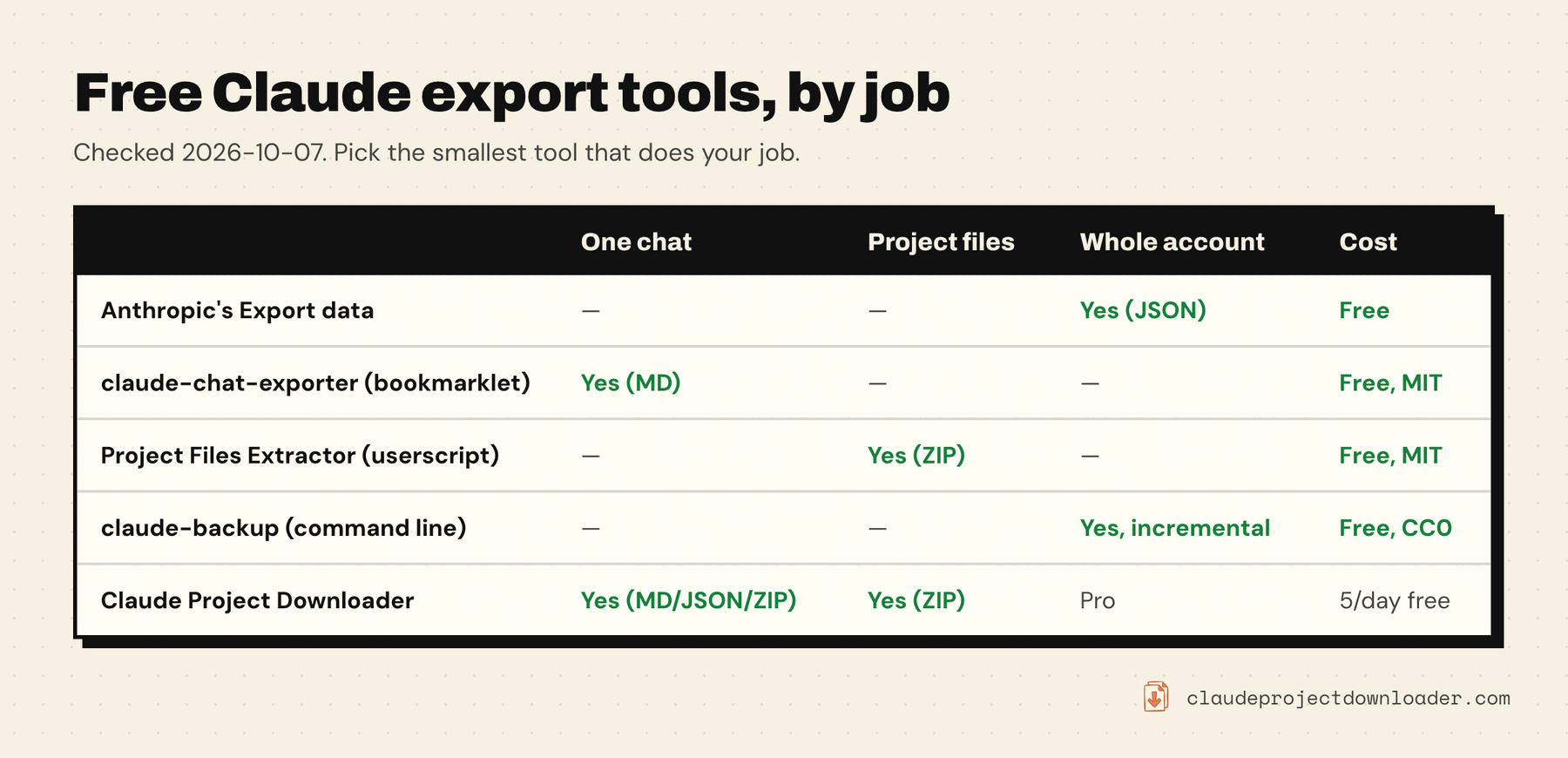
Anthropic's Export data (built in)
Where: claude.ai or Claude Desktop → your initials → Settings → Privacy → Export data. Cost: free. What you get: a download link by email to a ZIP of your conversation and account data as JSON. The link expires after 24 hours (Anthropic's help article).
Good for: a complete, official record of every chat. Everyone should run it occasionally. Not good for: reading a single chat, getting project files back as files, or anything scheduled. Team and Enterprise members can't run it; only the Primary Owner can.
Enough on its own if: you want an archive and you're fine with JSON.
claude-chat-exporter (bookmarklet)
Where: github.com/agarwalvishal/claude-chat-exporter. Cost: free, MIT licence, actively maintained (last updated September 2026). What you get: one click on a bookmark saves the open chat as a Markdown file. Artifacts, files Claude created and charts come along as code blocks, and attachments are embedded, linked or inlined. The Markdown has YAML frontmatter, so it drops into Obsidian cleanly.
Good for: saving individual chats as high-quality Markdown, at no cost, with no limit. Not good for: project knowledge files, many chats at once, or keeping uploaded files as separate files.
Enough on its own if: you save a chat now and then and only need the text. Honestly, for that job it's as good as anything paid.
Claude Project Files Extractor (userscript)
Where: Greasy Fork, by sharmanhall. Cost: free, MIT licence, version 5.0.0 updated 28 September 2026. What you get: an export button on the project page that downloads the project's knowledge files as one ZIP, including actual PDF files, with a metadata file listing what worked and what didn't.
Good for: getting a project's files back without a dedicated extension. Not good for: chats or project instructions. You also need a userscript manager such as Tampermonkey first.
Enough on its own if: you only need the files from a project or two.
claude-artifacts-downloader (Chrome extension, unpacked)
Where: github.com/ashwanthkumar/claude-artifacts-downloader. Cost: free, MIT licence. What you get: a button that downloads every artifact in a chat as a ZIP.
The catch: it was last updated in October 2024, and you install it unpacked, not from the Chrome Web Store. Claude has changed how it stores artifacts and generated files since then, so test it on a chat you care about before trusting it. See how to download Claude artifacts for what works today.
claude-backup (command line)
Where: github.com/twilligon/claude-backup, run with uvx claude-backup.
Cost: free, CC0.
What you get: a local copy of every chat your account can open, every branch included, as JSON, updated incrementally on each run. A companion tool, claude2md, converts it to Markdown.
Good for: developers who want a complete, scriptable, scheduled backup of their chats. Not good for: anyone who doesn't use a terminal, or for project knowledge files.
AI Chat Exporter (Chrome extension, freemium)
Not open source, but widely used. Its Chrome Web Store listing shows 100,000 users and says Markdown, text, CSV and JSON exports are free and unlimited, with 3 free PDF exports a day. It saves one chat at a time and is a good pick if you specifically want PDFs of single chats.
Claude Project Downloader (Chrome extension)
Where: Chrome Web Store. This is our extension. Cost: free plan with 5 single downloads a day (a chat or a file) and one bulk export. Pro removes both limits. What you get:
- A Download button next to Share on every chat: Markdown, JSON, or a ZIP with the transcript, your uploads and the files Claude created.
- A side panel on project pages: Download All Files, Download All Chats, and Download Entire Project (instructions, files and chats in one ZIP).
- Pro: Back up everything, every project and chat in one ZIP, on demand or automatically daily or weekly.
Not good for: PDF (it doesn't make PDFs), or heavy single-chat use on the free plan: the bookmarklet above has no daily limit.
Worth it when: you want projects and chats in one tool, files saved as files, or backups you don't have to remember. See how to download all files from a Claude project and how to back up Claude projects and chats.
A word on safety
Bookmarklets, userscripts and extensions that export Claude chats all work the same way: they run in your browser, signed in as you. That's why they can read your chats, so only install ones you trust. Open-source tools let you read the code before running it. Claude Project Downloader's source is published on GitHub. It saves straight to your Downloads folder and doesn't send your chats or files to any server.