Claude Failed to Download Files? Causes and Fixes
 By Aarohan Niraula8 min read
Claude failed to download files it made for you? Find the cause, from a file that was never created to a switched-off setting, then get the file out anyway.
When Claude failed to download files it made for you, the cause is usually one of six things: Claude never made a real file, file creation is switched off, the file isn't where the Download button looks, the app you're in won't save it, your browser blocked it, or Claude is having an outage. Start by checking that the reply shows a file card with its own Download button. Then try the same chat on claude.ai in a browser. If the button still fails, ask Claude to share the file again, or to print its contents in the chat so you can copy them.
Everything here is about files in your own chats, in your own Claude account.
What "Failed to download files" means
Claude doesn't attach files the way email does. Anthropic's file creation page explains that Claude has "a private computing environment" where it writes and runs code. A spreadsheet, a Word document or a PDF is built there, and then Claude hands you a card in the chat with a Download button. Clicking it fetches the file from that environment.
"Failed to download files" means that fetch didn't work. Anthropic's help pages don't quote the message. The wording comes from people who've seen it: one r/ClaudeAI thread reports "Failed to download files" on the button and "Failed to load file content" in the preview, and a poster in r/Anthropic describes regular "Download failed" messages.
The message doesn't say why, and it doesn't mean the file is gone. Your chat is still there, and so is everything Claude wrote in it.
Why Claude failed to download files: six causes
Work down the list. The first two are about whether a file can exist at all.
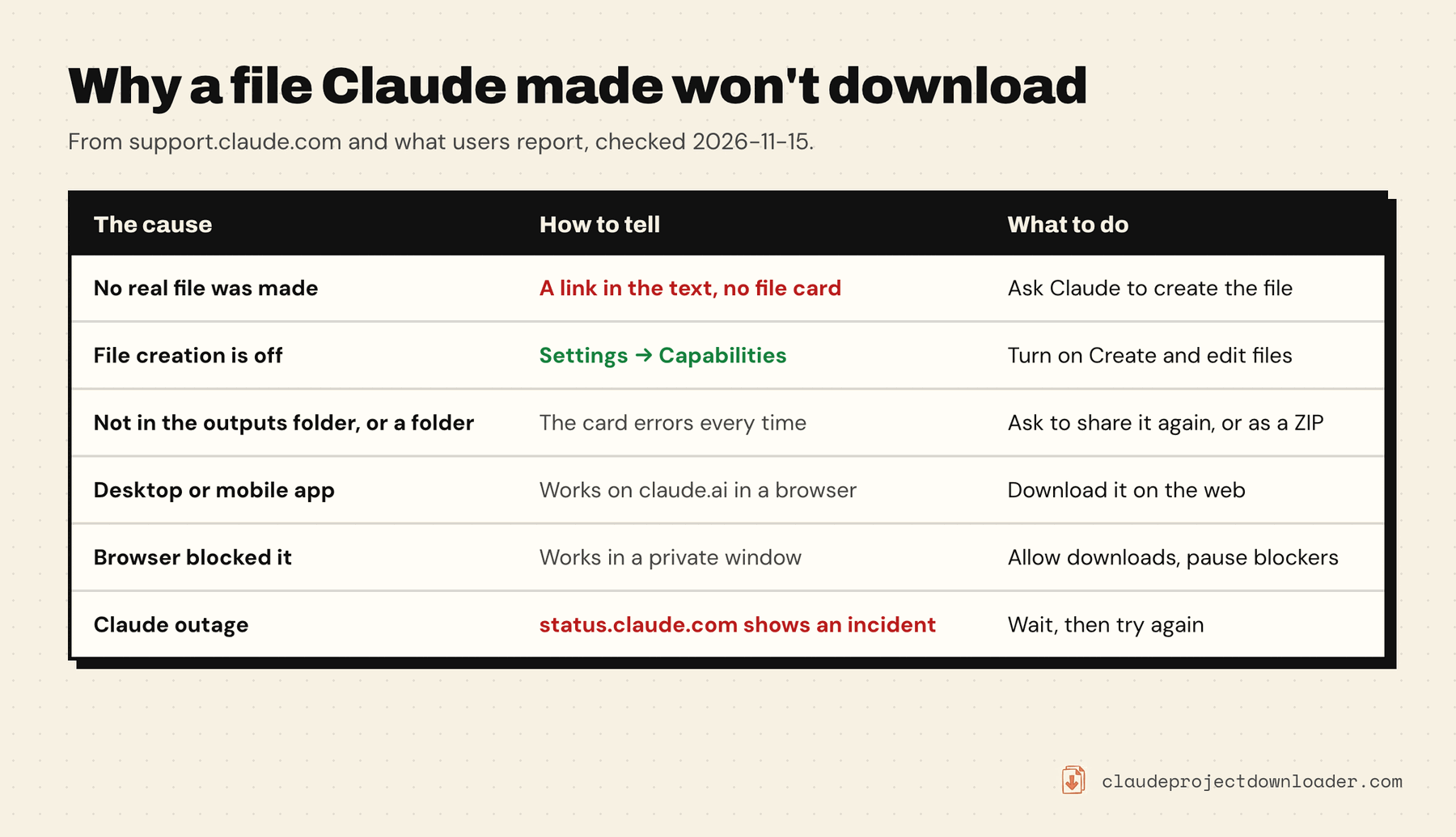
1. There's no real file. If Claude's reply has a link or a file name in the text but no file card, there's nothing to download. This happens when file creation is off, and sometimes when Claude describes a file instead of building it. Ask: "Create that as a real file and share it." If the setting is off, turn it on first (next section).
2. File creation is switched off. The files live in Claude's computing environment, and that environment only exists while Code execution and file creation is on. Anthropic says it plainly on its account migration page: if an organization has the feature turned off, "files Claude created in your chats move but can't be opened". On Team and Enterprise plans an owner controls the switch, so a file you made last month can stop opening without anything changing on your side.
3. The file isn't where the button looks. Building our extension, we've seen that Claude's Download button fetches files from one place in its environment, an outputs folder under /mnt/user-data/. A file Claude left in its working folder isn't served. The same goes for a folder: in one Reddit thread, Claude itself replied that it "can only download individual files, not entire directories" and offered a ZIP. This is our observation and a user report; Anthropic doesn't document the folder layout.
4. The app won't save it. On the phone, Anthropic says tapping Download opens the file "in either the system preview or a separate app (for example, the Word app for .docx files)". It doesn't land in a downloads folder, so it can look like nothing happened. On the desktop app, people have reported downloads failing on macOS while the same chat downloaded fine in a browser.
5. Your browser blocked it. Browsers can stop a site from saving several files in a row, and a content blocker or a company security tool can cut the request. If the file card works in a private window with extensions off, the cause is on your computer.
6. Claude is having a bad day. When downloads fail for everyone at once, it's on Anthropic's side. Check status.claude.com. If there's an incident, wait. Don't regenerate the file ten times, because each attempt uses your usage limit.
Two smaller ones. Anthropic caps files at "30MB per file for both uploads and downloads". And after Claude uses your linked accounts in Personal Finance in a chat, Anthropic says "it may not be able to run code, make other files (Word, Excel, PowerPoint, or PDF), or publish an artifact". Plain text files such as .csv, .md and .html still work there.
Fix a failed download, step by step
- Look for the file card. No card means no file. Go to cause 1.
- Check the setting. Open Settings → Capabilities and make sure Code execution and file creation is on. In the updated Settings layout it's called Create and edit files. Anthropic says it's on by default on Free, Pro, Max and Ultra. On Team and Enterprise, ask an owner; it's under Organization settings → Capabilities.
- Reload and try once more. A stale tab is the cheapest thing to rule out.
- Switch to claude.ai in a browser. If you're in the desktop or mobile app, open the same chat on the web and click Download there.
- Try a private window. Sign in, open the chat, click Download. If it works, turn off extensions one at a time in your normal window, and check whether the browser is blocking multiple downloads from claude.ai.
- Ask Claude to share it again. "Copy that file to your outputs folder and share it again" gives you a fresh card. If Claude made several files or a folder, ask: "Put them all in one ZIP file and share that."
- Check status.claude.com. If there's an incident, come back later. The chat and the file card will still be there.
Get the file out another way
If the button still won't work, you can usually get the content without it.
Ask for the contents in the chat. For anything that's text (Markdown, CSV, code, HTML, JSON), ask: "Print the full contents of that file in a code block." Use the copy button on the block, paste into a text editor, and save it under the right name. A very long file may get cut, so ask for it in parts if it stops early.
Save it to Google Drive. Anthropic's page says you can download the files Claude creates "or save them directly to Google Drive". If the card offers that, the file goes from Claude to Drive without touching your browser's download path.
Make it again in a new chat. If the old chat's environment won't serve the file at all, start a new chat, give Claude the content (paste it, or attach an exported copy of the old chat), and ask for the file again. Download it right away this time.
Can't download a Claude artifact?
Artifacts and files are two different things, and they download differently.
An artifact made from a template (a doc, a slide deck, a design) has an Export button, not a download card. A legacy artifact, made in a chat before September 16, 2026, has its download in "the controls at the top of the artifact panel", per Anthropic's artifacts page. Our guide on how to download Claude artifacts covers each type and the formats you get.
Two cases catch people out:
- A download button inside the artifact does nothing. If Claude built you a page with its own "Download CSV" button, the viewer may be blocking it. Anthropic's Claude Code artifact docs say the artifact viewer on claude.ai "blocks any download the page starts itself", including
data:andblob:links, and that the fix is to "ask Claude to rebuild them with the downloads capability". Anthropic enables that capability per account. - You're looking at a shared chat. Anthropic has "disabled public sharing of conversations that include any file artifacts from the code execution and file creation feature" for Free, Pro, Max and Ultra users. So if someone sends you a chat and the file isn't there, ask them to send the file itself.
Save a chat's files with Claude Project Downloader
Claude Project Downloader is a Chrome extension we make. It adds a Download button next to Share in your Claude chats. Choose ZIP with Attachments and you get the chat as a Markdown file plus an attachments folder with the files you uploaded and the files Claude made.
It helps with a failed download in one specific way:
- Text files Claude wrote are saved from the chat's own record. When Claude writes a file directly (a .md, .csv, .py, .html and so on), the full text is stored in the conversation. The extension reads it from there, so it doesn't depend on Claude's Download button working. The same text also appears in the Markdown transcript under "Claude created".
- Legacy artifacts come out as their own files with the right extension.
And here's where it doesn't help:
- Files Claude built by running code (Word, Excel, PowerPoint, PDF, images) are fetched from the same place Claude's own button uses. If Claude's servers won't serve the file, the extension can't get it either. The ZIP holds a short note naming the file in its place, so you know what's missing.
- It only reads chats you can open in the Claude account you're signed in to, in Chrome on a computer.
So it pulls every text file out of a long chat in one go. It isn't a way around a file that Claude can no longer serve.
Keep files from going missing later
Anthropic says "files remain available for download throughout your conversation". It also says it limits "the length of time you can use a single sandbox container". It doesn't promise that a file made months ago will still download, and a setting or an organization change can lock it, as cause 2 shows. A few habits make this a non-issue:
- Download a file when it's made. Don't treat the chat as storage.
- Before moving your account into a Team or Enterprise organization, download created files first. That's Anthropic's own advice on the migration page.
- Back up the chats that matter. How to back up Claude projects and chats covers the built-in export and the tools that add to it.
Frequently asked questions
Why does Claude say it failed to download files?
The Download button fetches the file from Claude's computing environment, and that fetch didn't work. The usual causes are that no real file was created, file creation is switched off, the file isn't in the folder the button reads from, the desktop or mobile app won't save it, your browser blocked the download, or Claude has an outage. Your chat is untouched.
How do I download a file from Claude AI?
Ask Claude to create the file, then click Download on the file card that appears in the reply. This needs Code execution and file creation (Create and edit files in the updated layout) turned on under Settings, Capabilities. On the mobile apps, Download opens the file in the system preview or another app, and you save it from there.
Why can't I download a Claude artifact?
Artifacts don't use a download card. Template artifacts have an Export button, and legacy artifacts have a download control at the top of the artifact panel. If a download button inside an interactive artifact does nothing, Claude's viewer is blocking a download the page started itself; ask Claude to rebuild it with the downloads capability.
How do I download a shared Claude artifact or file?
A published artifact opens at its own link, and you can view it there. Files are different: Anthropic has disabled public sharing of chats that include files made with code execution and file creation on Free, Pro, Max and Ultra, so a shared chat won't carry the file. Ask the person to send you the file itself.
Do files Claude creates expire?
Anthropic says files remain available for download throughout your conversation, and separately that it limits how long a single sandbox container can be used. It also says created files can't be opened once an organization has file creation turned off. The safe habit is to download a file when Claude makes it.
Can I download several files from Claude at once?
Ask Claude to put them in one ZIP file and share that; it can't hand you a folder. For text files Claude wrote, Claude Project Downloader's ZIP with Attachments option saves all of them from one chat in a single download.