How to Back Up Claude Projects and Chats
How to back up Claude projects and chats: Anthropic's free export, a free command-line tool, or automatic local backups, and what each one misses.
Claude keeps your chats and projects in your account only, so to back up Claude projects and chats you have to save a copy yourself. If a chat gets deleted, a project gets cleaned up, or you lose access to a workspace, there's no copy anywhere else. The simplest free backup is Anthropic's own: Settings → Privacy → Export data, which emails you your whole chat history as JSON. To also keep your projects in readable form (instructions, knowledge files and chats as normal files on your computer), use a tool that exports from your account. Optionally, run it automatically.
Everything below backs up your own account: the projects and chats you can already open on claude.ai.
What a Claude backup should actually contain
A Claude project is more than its chats. A useful backup has:
- Project instructions: the custom instructions you've refined over weeks.
- Knowledge files: the documents you uploaded, ideally in their original format.
- Chats: inside projects and outside them, in a format you can read without Claude.
- Files from chats: attachments you uploaded and files Claude created.
No single free route covers all four. Here's what each one gets you.
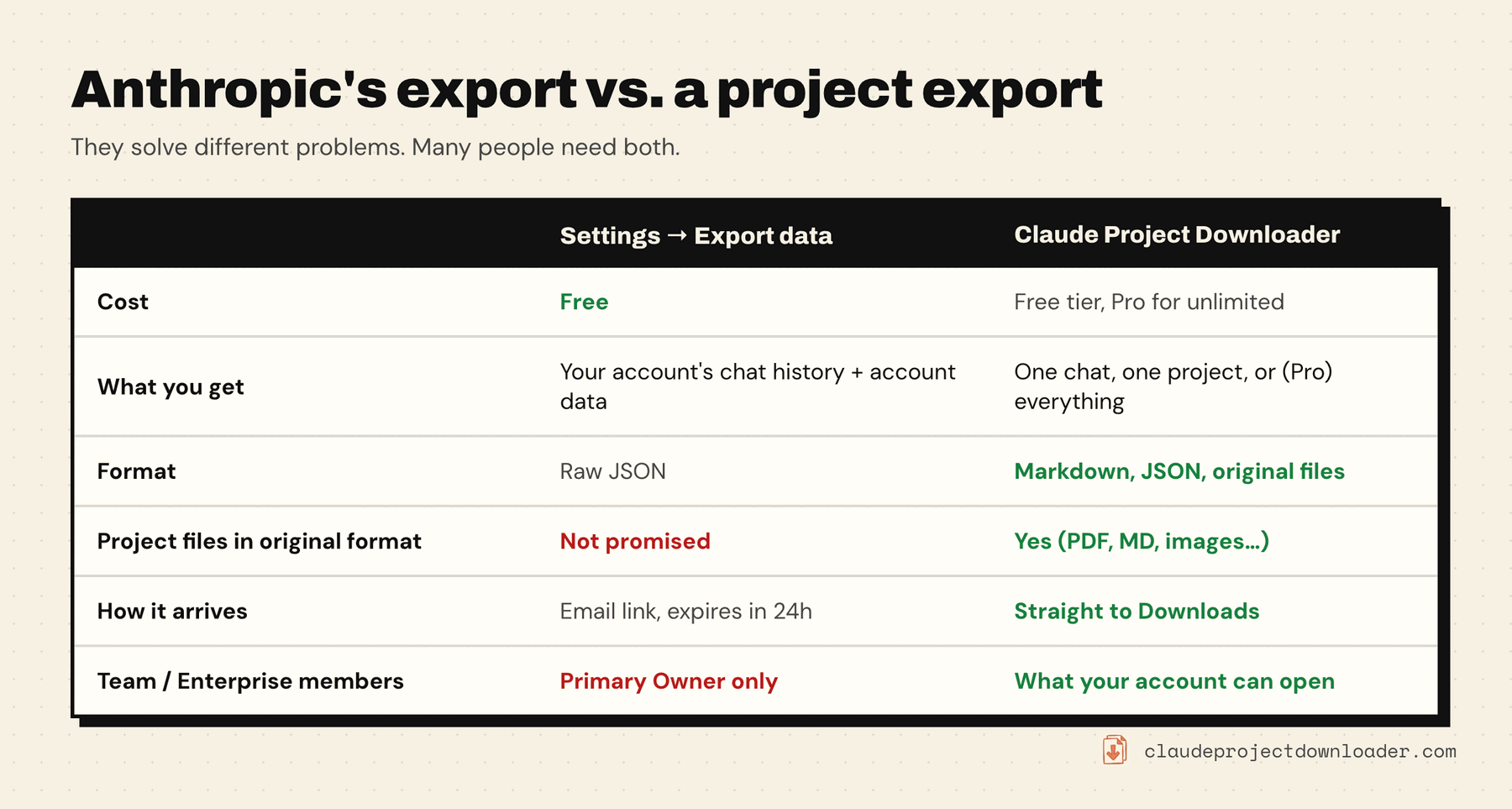
Option 1: Anthropic's data export (free, every chat)
- On claude.ai or Claude Desktop, click your initials in the lower-left corner, then Settings.
- Open Privacy and click Export data.
- Download the ZIP from the email link while signed in. The link expires after 24 hours.
According to Anthropic's help article, the export includes your conversation data and account data. It's the most complete record of your chats, and it's free. Things to plan around:
- Format: JSON. Fine for an archive or a script, but not for reading. You'll need a converter to get one Markdown file per chat.
- Manual each time: there's no schedule. A backup you have to remember tends to be months old when you need it.
- Projects: the help article doesn't promise project knowledge files back in their original format.
- Team and Enterprise: only the organization's Primary Owner can export.
Do this at least once, whatever else you use. It's free and it's Anthropic's own copy.
Option 2: a free command-line backup (technical users)
claude-backup is an open-source (CC0) tool you run with uvx claude-backup. It saves every chat your account can open, including every branch, as JSON on your computer. Re-runs only fetch what changed since the last run. A companion tool, claude2md, converts the JSON to Markdown. It describes itself as unofficial, and it focuses on chats rather than project knowledge files. If you're comfortable in a terminal and want chats only, it's an excellent free option.
Option 3: export a project in one click
For one project, Claude Project Downloader does it from the page. Open the project, click the extension icon, and press Download Entire Project. One ZIP contains:
instructions.md: the project's instructions- every knowledge file, in its original format where Claude stores one (see which files come back exactly)
chats/: every chat in the project, as Markdown or JSON, with attachments if you tick the option
The free plan includes one full-project export, which is enough to rescue the project that matters most today. Pro makes it unlimited.
Option 4: back up everything automatically (Pro)
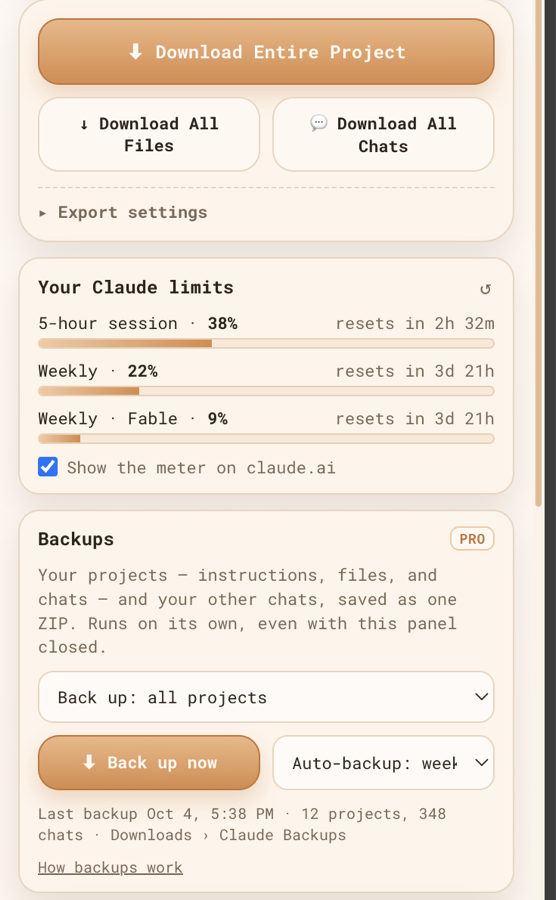
Back up everything is a Pro feature of Claude Project Downloader built for exactly this. From the side panel:
- Choose Back up: all projects, or projects I choose.
- Keep Also chats outside projects ticked to include every other chat.
- Press Back up now, or set Auto-backup to daily or weekly.
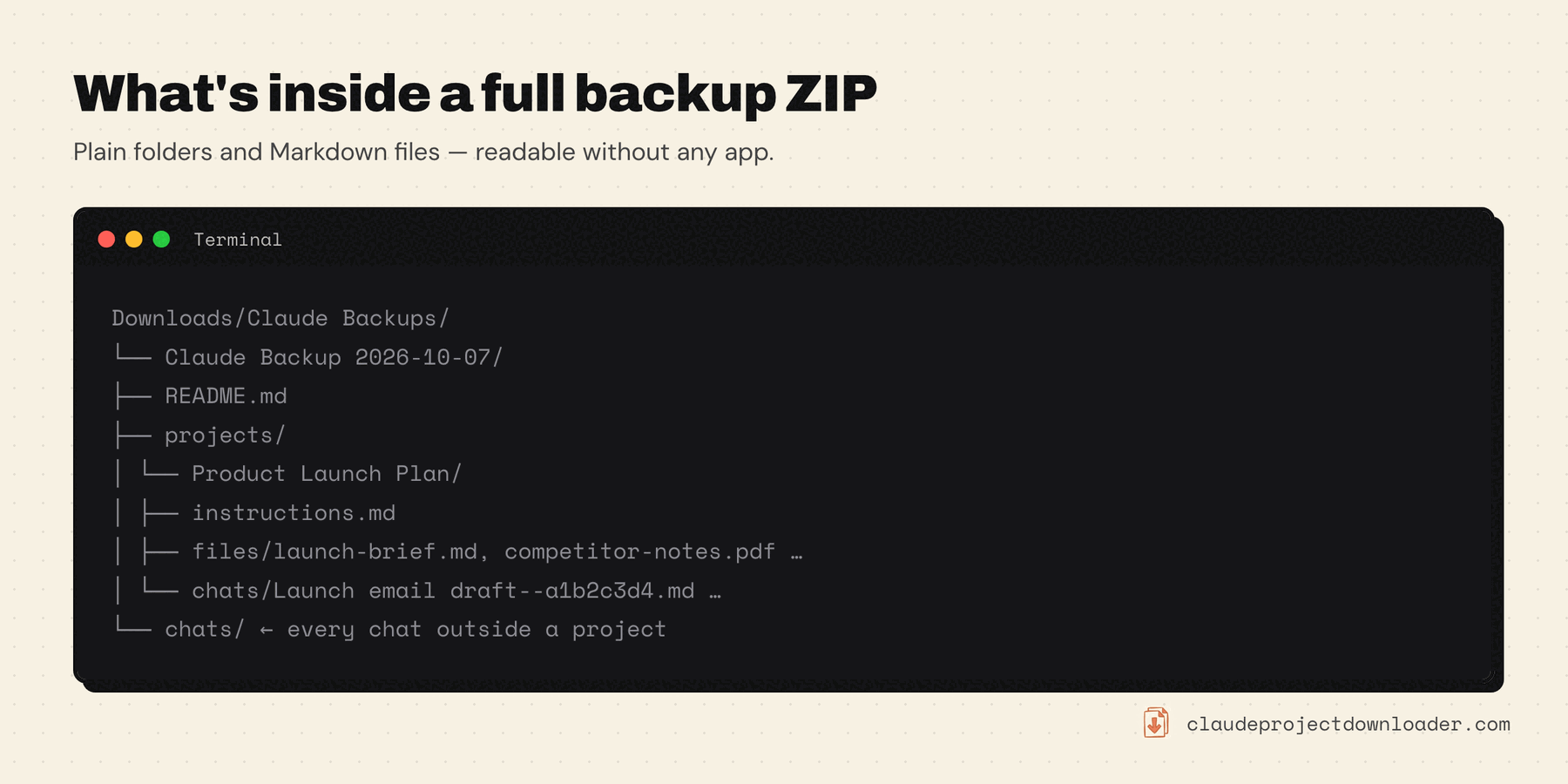
Each backup is one ZIP in Downloads › Claude Backups, laid out as plain folders:
How it behaves, so there are no surprises:
- Local only. Backups are built in your browser and saved to your own Downloads folder. Nothing is uploaded to a cloud.
- Runs without the panel open. Automatic backups run while your computer is on, Chrome is open and you're signed in to claude.ai. If one is missed, it runs the next time those are all true.
- Your account only. It backs up what your signed-in account can open, nothing more.
To keep an off-site copy, point a cloud-sync folder (iCloud Drive, Google Drive, Dropbox) at your backups, or copy the ZIPs there yourself.
Which should you use?
- You want a complete record and don't mind JSON: the official export (option 1), a few times a year.
- You're technical and only care about chats: claude-backup (option 2).
- One project matters right now: Download Entire Project (option 3). The free export covers it.
- You live in Claude and want backups without remembering them: Back up everything on a weekly schedule (option 4), plus the official export now and then.