Claude Conversation Too Long? How to Fix It and Keep Going
 By Aarohan Niraula7 min read
Claude conversation too long? What each length message means, the setting that lets Claude summarize instead of stopping, and how to move to a new chat intact.
When Claude says "This conversation is too long to continue", the chat has filled the model's context window, the amount of text Claude can read at once. Everything counts: your messages, Claude's replies, attached files, tool results and connectors. Waiting won't help, because a Claude conversation too long for its window is a size limit, not a usage limit. Free up room by turning tools off, turn on the setting that lets Claude summarize older messages, or save the chat and carry its context into a new one.
Everything here is about your own chats, the ones you can already open on claude.ai.
Why a Claude conversation gets too long
Claude rereads the whole conversation every time you send a message. Anthropic's usage and length limits page calls the context window "Claude's working memory", and a chat can only grow until it fills it.
How big that window is depends on the model. Anthropic's context window page, checked on 8 November 2026, lists 1M tokens for the newest models on paid plans (Opus 5.5, Sonnet 5.5 and Fable 5.1, for example), 500K for some earlier ones such as Opus 4.8 and Sonnet 4.6, and 200K for the rest. A token is about four characters of English, and 200K tokens is roughly 500 pages. Part of the window is always kept back for Claude's reply.
Some chats fill up faster than their length suggests:
- Files. A long PDF or a pasted document can take more room than hours of typing.
- Tools and connectors. Web search, Research and connected apps add their results to the chat, and Anthropic calls them "token-intensive".
- Projects. In a project chat, the project's instructions and files come along too.
- Switching models. A chat that fits a 1M-token model can be too long for a 500K one, so switching to a smaller window mid-chat can put you over at once.
Which message are you seeing?
Claude shows several different messages about limits, and people often mix them up. The fix depends on which one you have.
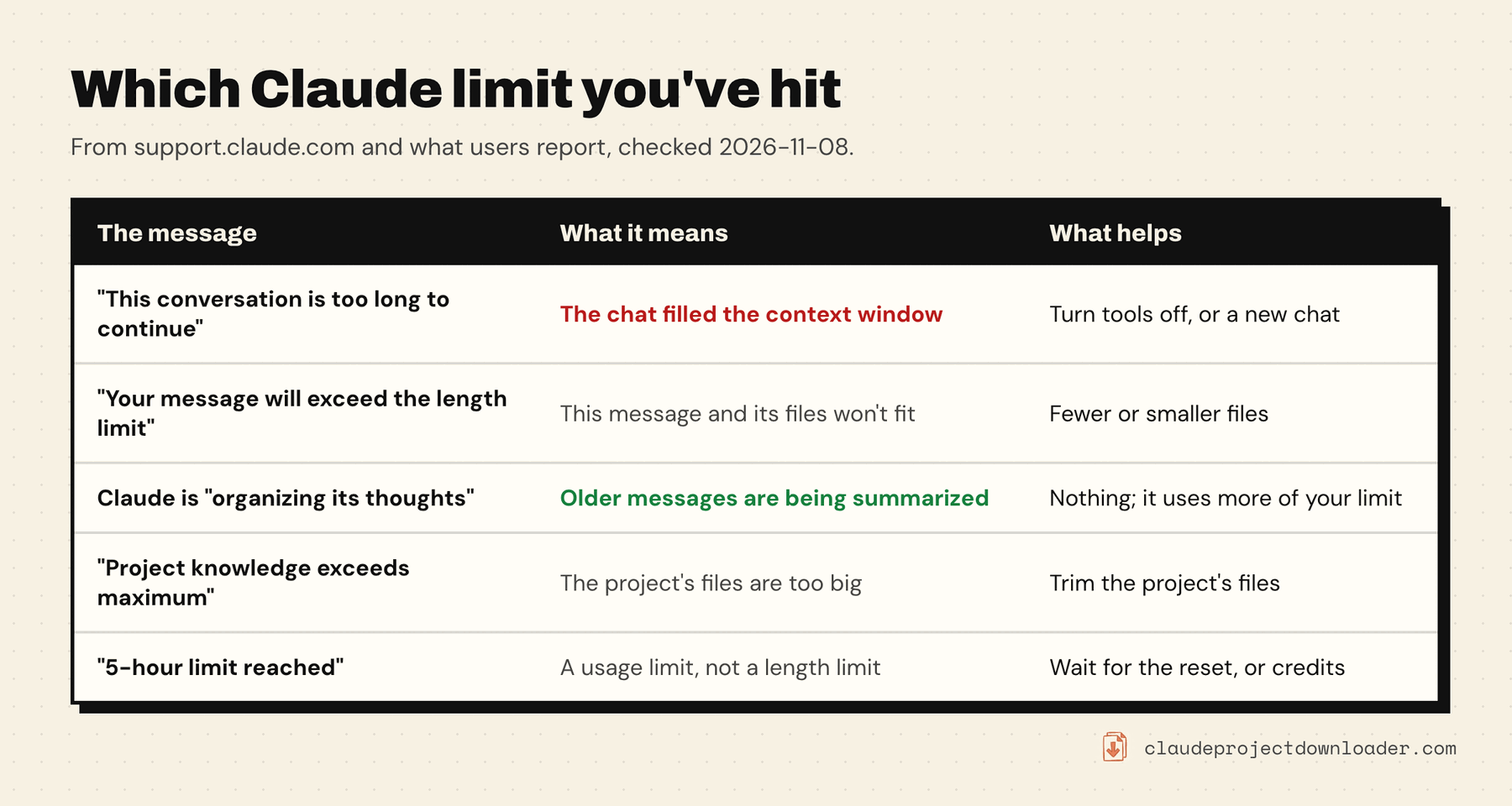
- "This conversation is too long to continue. Start a new chat, or remove some tools to free up space." The whole chat is full. Older versions of Claude said "Claude hit the maximum length for this conversation". The rest of this guide is about this one.
- "Your message will exceed the length limit for this chat. Try attaching fewer or smaller files or starting a new conversation." This one message, with its attachments, won't fit in the space left. Anthropic's error messages page suggests splitting the content, summarizing it first, or sending fewer files.
- Claude is "organizing its thoughts". Nothing is wrong. That's automatic context management at work (next section).
- "Project knowledge exceeds maximum. Remove files to continue." The project's files are too big, not the chat. See how to fix Claude project knowledge exceeds maximum.
- "5-hour limit reached" or "You've reached your weekly limit". That's a usage limit. It resets on a schedule, and on a paid plan with usage credits turned on, your work continues on credits instead.
Turn on automatic context management
This is the setting that stops most chats from ever hitting the wall. With it on, as the conversation nears the context window, Claude summarizes earlier messages and carries on. Anthropic says your "full chat history is preserved so Claude can reference it even after summarization".
It only works with code execution on:
- Open Settings → Capabilities.
- Turn on Code execution and file creation. In the updated Settings layout it's called Create and edit files.
Per Anthropic's file creation page, it's on by default on Free, Pro, Max and Ultra, so check whether you switched it off. On Team and Enterprise plans an owner controls it under Organization settings → Capabilities; if it's off there, ask them.
Three catches:
- Anthropic's context-window and error pages describe automatic context management for paid plans. On the free plan, expect the hard limit.
- A very large first message can still be too long, because there's nothing earlier to summarize.
- Summarized chats use more of your usage limit. If you're running low, a fresh chat stretches it further.
Free up room in the chat you're in
If the chat still takes messages, these slow down how fast it fills. What's already in the chat stays, so they buy time rather than empty it. All of them come from Anthropic's own advice:
- Turn off tools and connectors the chat doesn't need, and ask Claude not to search the web when you don't need current information.
- Lower the effort level, or turn thinking off on models that have the toggle. Higher effort uses more tokens.
- Move reference material into a project. On paid plans, a large project searches its files for the relevant parts instead of reading them all in every message.
- Send big documents in pieces, or ask for a summary of each section in its own chat and bring only the summaries back.
Move to a new chat without losing the context
When a chat is truly full, the answer is a new chat. The work is moving what matters into it.
1. Save the old chat first. It stays in your chat history, but a file is what you can attach, search and keep. Your free options are copying the replies you need, a free open-source bookmarklet that saves the chat as Markdown, or Settings → Privacy → Export data, which emails your whole account as JSON. How to export Claude chats covers both, plus the extension route below.
2. Ask for a handoff summary, if the chat still answers. Something like: "Write a summary for a new chat that can't see this one: the goal, the latest version of the work, decisions with their reasons, things we ruled out, my rules on tone and format, and the next step. Under 800 words." Read it before you rely on it.
3. Start the new chat inside a project. Add the summary to the project's knowledge, so every later chat in that project can read it too. Keep the full transcript as a file you can check, not as context: attaching the whole of a too-long chat fills the new one just as fast.
4. On a paid plan, ask Claude to look back. Claude can search your past chats on Pro, Max, Ultra, Team and Enterprise. Ask "find our chat about the launch plan" and it pulls in the relevant parts. The setting is Search and reference chats under Settings → Your Claude. If Claude answers that conversation search is not enabled, that guide lists the causes and the free ways to search instead.
Save the chat, and see how full it is
Claude has no download button for a conversation. Claude Project Downloader adds one next to Share on every chat page. It saves the chat as Markdown, JSON or PDF, or as a ZIP with the files you uploaded and the files Claude made. The Markdown file is the one to keep for step 1: readable, searchable, and small enough to pull a section from.
The extension also shows how long a chat is getting before it fails. Its usage meter sits next to claude.ai's model picker. Click it and This chat's context shows an estimate, such as "≈ 38k". Past about 40,000 tokens it adds: "Long chat: every message re-sends all of it. A new chat stretches your limit."
The estimate is a rough count of the message text at four characters a token. It doesn't count attachments, project files or tools, so the real context is larger. Treat it as an early warning, not a reading of Claude's own meter.
Claude Code and Cowork: compacting conversations
The "compacting" variants of this question are mostly about Claude Code, where you control it yourself. Per the Claude Code commands reference:
/contextshows what's filling the window, with suggestions for heavy tools and memory files./compactsummarizes the conversation to free space. Add focus instructions, such as/compact keep the API decisions, to steer what the summary keeps./clearstarts a new conversation with empty context, while keeping project memory./resumebrings the old one back.
Claude Code also compacts on its own as the window fills, so a full context doesn't end the session, and it can compact a session you leave idle. /autocompact with a token count, such as /autocompact 500k, sets how full the window gets first, per the context window docs. If it keeps compacting, the session is close to full again after each summary. Starting a new task with /clear usually works better than compacting over and over. Save the session first if you'll want it: how to export a Claude Code conversation covers /export and the transcript files.
Claude Cowork compacts on its own as well. Anthropic's context window page notes that Sonnet 5 in Cowork compacts the conversation at 500K tokens.
Frequently asked questions
What does "This conversation is too long to continue" mean in Claude?
The chat has filled the model's context window: all its messages, replies, files and tool results no longer fit in what Claude reads at once. It's a limit on that one chat. Turn off tools you don't need, turn on code execution so Claude can summarize older messages, or start a new chat with a summary of this one.
Will waiting fix a Claude conversation that's too long?
No. Waiting resets usage limits, such as the five-hour session limit, but a length limit is about the size of the chat and it stays the same tomorrow. Free up room in the chat or move to a new one.
Why does Claude keep compacting my conversation?
Your chat keeps reaching the context window, so Claude summarizes the older part each time to make room. On claude.ai this is automatic context management, shown as Claude organizing its thoughts. Claude Code does the same automatically, or when you run /compact. Compacted chats use more of your usage limit, so for a new task a fresh chat is often better.
Does Claude forget the conversation after it summarizes it?
Not completely. Anthropic says the full chat history is preserved so Claude can still refer back to it after summarizing. What's in Claude's working context is the summary plus recent messages, so for exact details, such as numbers or wording, quote them again or keep a saved copy of the chat.
How long can a Claude conversation be?
Up to the model's context window, minus room for the reply: 1M tokens on the newest models on paid plans, 500K or 200K on others, per Anthropic's context window page. 200K tokens is about 500 pages. With code execution on, paid plans summarize older messages, so most chats can keep going much longer.
How do I continue a long Claude chat in a new one?
Save the old chat, ask it for a short handoff summary if it still answers, then start a new chat (ideally in a project) and add that summary. Don't paste the whole old transcript in, or the new chat fills just as fast. On paid plans you can also ask Claude to search your past chats.