Claude Project Knowledge Exceeds Maximum: Limits and Fixes
Claude project knowledge exceeds maximum? What the limit really is in October 2026, how to find the files filling it, and how to trim it without losing them.
When Claude says "Project knowledge exceeds maximum. Remove files to continue", the files in that project no longer fit in the space Claude reads from in every chat. The cap is total size in tokens, not a number of files, so the fix is to find the few files taking most of the room, save copies of them, and remove or shrink them. On a paid plan Claude switches large projects to a search mode first, so the Claude project knowledge exceeds maximum message mostly shows up on the free plan or in very large projects.
Everything here is about your own projects, the ones you can already open on claude.ai.
Why Claude project knowledge exceeds maximum
Every file you add to a project goes into its project knowledge, and Claude reads that knowledge as context in each chat in the project. Anthropic's file upload limits put it plainly: project files can be up to 30 MB each, the number of files is unlimited, "but total content must fit within Claude's context window".
So the message isn't about one file being too big, or having too many files. It means the combined text of everything in the project, plus the project instructions, has reached the ceiling. Claude counts that text in tokens, roughly four characters of English each.
Two details catch people out:
- Claude extracts text from most files. For Word, text, HTML, CSV and similar files, only the extracted text counts. A 5 MB Word file full of photos can be cheap, and a 300 KB plain-text transcript can be expensive.
- The instructions count too. Project instructions are read in every chat as well, so long ones take room from the same context.
Claude project knowledge limits in October 2026
These are the numbers from Anthropic's help pages as checked on 16 October 2026. Anthropic changes them often, so the links go to the live pages.
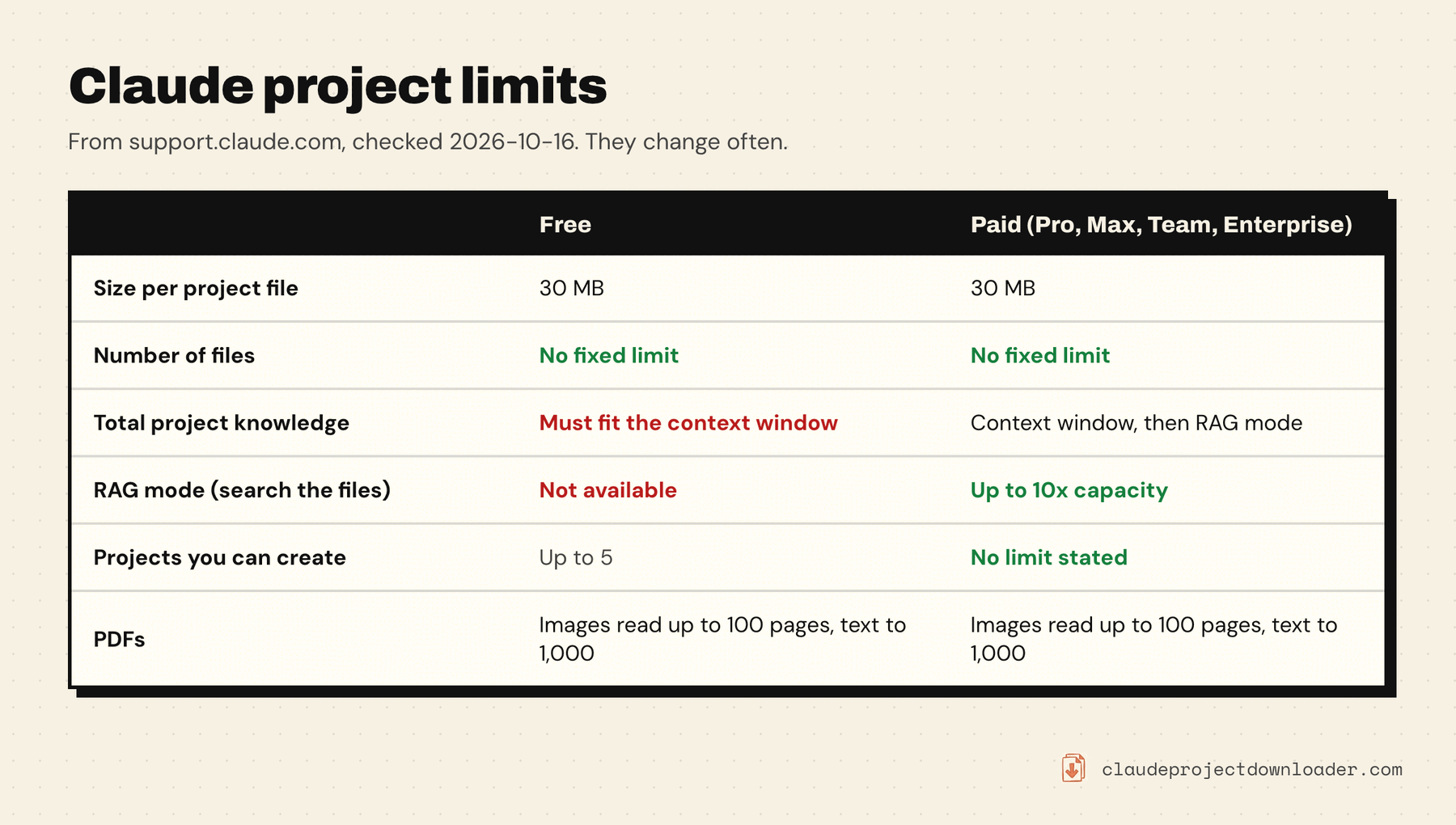
- Per file: 30 MB. Chat attachments allow 500 MB, but project files are smaller.
- Number of files: no fixed limit. The total has to fit.
- Total size: the model's context window. Anthropic's context window page lists 500K to 1M tokens for most current models on paid plans, and 200K for the rest. Many guides still say every project tops out at 200K; that's out of date for the newer models.
- RAG mode (paid plans): when knowledge approaches the context window, Claude switches to retrieval. It searches the files for the relevant parts instead of loading all of them, and Anthropic says this expands capacity "by up to 10x". You'll see an indicator on the project, and it switches back if the knowledge shrinks again.
- Projects: free accounts can create up to five, per Anthropic's projects help page.
- PDFs: Claude reads text and images in PDFs up to 100 pages, and text only from 101 to 1,000 pages. Over 1,000 pages won't upload at all.
If you're on the free plan, RAG isn't available, so hitting the context window is a hard stop. On a paid plan, seeing the message means even the expanded capacity is used up, which takes a very large project.
Find the files filling your project
Before removing anything, find out which files are heavy. Often a few files account for most of the total.
In Claude. Open the project and open its Context panel, on the project's main page where the files are listed (Anthropic's help pages call it the project's Files section). In the current layout it shows a capacity bar and each file's size. Size in MB is a rough guide only, for the reason above: what fills the project is tokens, not bytes.
Ask Claude. In a chat inside the project, ask it which knowledge files are longest. It can usually tell you which documents are large, but it's estimating from what it can see, so treat the answer as a hint.
With Claude Project Downloader. The extension's side panel has a card called What's filling this project. It ranks the project's files by token count, using the numbers Claude reports for each file, and shows each file's share of the total, with the instructions listed separately. Images and other binary files that Claude gives no count for are listed as such, so the total isn't misleading.
Save copies before you remove anything
Removing a file from project knowledge deletes Claude's copy. If the original is still on your computer or in cloud storage, you're fine. If it isn't, save it first, because Claude has no download button for project files.
The free ways to get them out are covered in how to download Claude project files: copying each file by hand, asking Claude to bundle them, or the free Claude Project Files Extractor userscript.
In Claude Project Downloader, tick the heavy files in the What's filling this project card and click Back up checked (ZIP). Only those files are saved, in one ZIP, in their original format where Claude keeps one. Word documents come back as text, because Claude only stores their extracted text. On the free plan this uses your one bulk export; single files can also be saved one at a time from the Files list, as part of the 5 free downloads a day.
How to remove project files in Claude
- Open the project on claude.ai and open its Context panel.
- Click Select, then tick the files you want to remove. Files inside a folder appear when you open the folder.
- Click the delete (trash) button and confirm.
The extension can do the ticking for you. After the backup, click Remove in Claude… in the same card. It opens Claude's Context panel, switches it to Select, and ticks the same files. It doesn't delete anything: it highlights Claude's own delete button, and you press it and confirm. Nothing is removed until you do.
Ways to fit more without losing anything
Removing whole files isn't the only fix. Often the better move is to make the knowledge leaner:
- Delete old versions and duplicates. Projects collect "final", "final v2" and "final v3". Keep one.
- Cut long files down to what you use. If you only ever ask about two chapters of a 400-page manual, upload those chapters. Split big documents into smaller ones so you can keep only the parts that matter.
- Strip the noise from text. Timestamps in transcripts, repeated headers and footers, logs, lock files and build output all cost tokens and rarely help. A Reddit thread shows how a handful of plain-text transcripts can fill a project on their own.
- Shorten the instructions. Anthropic's advice is to keep project instructions concise: general context, key guidelines and Claude's role.
- Split the project. If one project covers two jobs, two projects with half the files each will each have room to spare.
- Attach rarely used files to a single chat. A file you need once doesn't have to live in project knowledge. Upload it to the chat where you need it.
- Upgrade, if it's worth it to you. On a paid plan, a large project switches to RAG instead of stopping. Claude then searches the files for the relevant parts in each chat instead of reading all of them.
Keep the project from filling up again
Once it fits, a little routine keeps it that way. Check the context card or the Context panel when you add a big file. Keep the originals of every knowledge file somewhere outside Claude, so removing a file is never a loss. If the project matters, back up the whole thing now and then: how to back up and export Claude projects covers the free export and the extension's project ZIP, which includes the instructions and every chat as well as the files.