Conversation Search Is Not Enabled in Claude: How to Fix It
 By Aarohan Niraula7 min read
Claude says conversation search is not enabled? Why it happens on free plans and switched-off settings, the toggle to check, and free ways to search your chats.
"Conversation search is not enabled" means Claude's past-chat search isn't available in the place you tried to use it. The usual reason is the plan: Anthropic offers past-chat search on paid plans only, so the message tends to appear on a free account, or right after a subscription ends. On a paid plan, check that Search and reference chats is switched on under Settings → Your Claude. If neither applies, the chat itself may have been started with memory off, or your organization may block search.
Everything here is about your own chats, the ones in your own Claude account.
What "Conversation search is not enabled" means
Claude has a tool for looking through your earlier chats. Anthropic's chat search and memory page describes it: you ask "Can you find our conversation about the launch plan?", Claude searches your previous conversations, and the search shows up in the chat as a tool call. The message appears when that search isn't available to you.
Anthropic's help pages don't quote the message itself. What we know about when it appears comes from people who've seen it. In one r/ClaudeAI thread, the poster got it when using search and couldn't find a setting for it. A reply explains why: they started seeing it after cancelling their paid plan.
So read it as "this account, or this chat, doesn't have past-chat search right now". Your chats are still in your account. Nothing has been deleted, and you can still open each of them from your chat list.
Why conversation search is not enabled on your account
There are five likely reasons. Start at the top; the first two cover most cases.
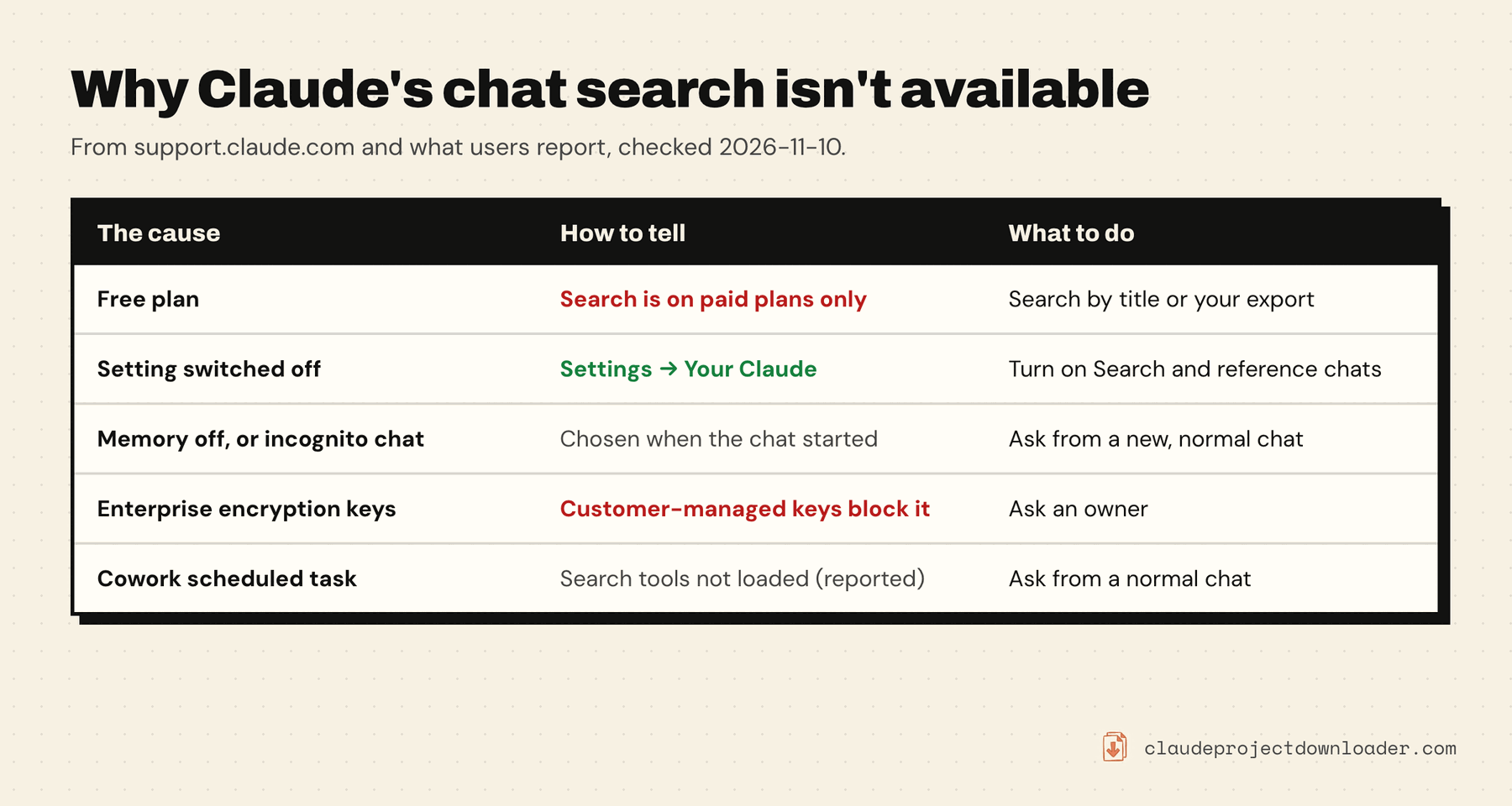
1. You're on the free plan. Anthropic's page says: "Searching past chats is available to users on paid plans (Pro, Max, Ultra, Team, and Enterprise plans) on the web, Claude Desktop, and Claude Mobile apps." If your subscription lapsed or you switched accounts, search goes with it. There's no setting to turn on. The free routes below still work.
2. The setting is switched off. On paid plans, search is on by default once it reaches your account, but it has a switch and you may have turned it off. The next section shows where it is.
3. The chat was started with memory off, or in incognito. Claude lets you turn memory off for a single chat from the + menu before the first message. Anthropic says that in such a chat Claude "doesn't search your past chats from it". The choice is locked once the chat starts, so open a new chat and ask there.
4. Your organization blocks it. On Enterprise, Anthropic says you "can't search past chats if your organization uses customer-managed encryption keys", because the conversation content is encrypted. Organization data retention rules apply to chat search too. Only an owner can tell you which of these applies to your workspace.
5. You're in a Cowork scheduled task. Users report that sessions started by a scheduled task don't load the search tools (an open request on GitHub, October 2026). Ask from a normal chat instead.
If none of these fit, the feature may not have reached your account yet. Anthropic's wording is "once the ability to search past chats is rolled out to your account, it will be enabled by default".
Turn on Search and reference chats
On a paid plan:
- Open Settings on claude.ai or in the desktop app.
- Open Your Claude. In the older Settings layout the same controls are under Memory, and accounts still on legacy memory find them under Capabilities, in the Memory section.
- Turn on Search and reference chats.
- Start a new chat and ask about an earlier one: "What did we discuss about the pricing page?"
When it works, you'll see the search as a tool call in the chat, and Claude's answer links back to the chats it used.
On Team and Enterprise plans, if the switch is missing or greyed out, ask an owner. Anthropic's page documents owner controls for memory under Organization settings → Capabilities, and your organization's retention policy applies to search.
What Claude's chat search can and can't find
Getting the setting right doesn't mean every chat turns up. Anthropic lists these boundaries:
- Outside a project, Claude searches all your chats that aren't in a project.
- Inside a project, it searches that project's chats only. To find something from another project, ask from a chat in that project.
- Incognito chats are never searched. They aren't saved to your history at all.
- Chats that used linked accounts in Personal Finance are left out by design.
- Older Cowork tasks aren't included. Anthropic's page on Cowork and chat says search "covers your chats and new conversations", and that you can still find older tasks by name in Recents.
It's also a search by meaning, not an exact-word lookup. Anthropic says it uses retrieval (RAG), which pulls in passages that seem relevant to your question. That's good for "what did we decide about X". It's less reliable for "find the chat where I pasted this exact error", and it can't promise a full list of every chat that mentions a word.
Search your Claude chats without it
These work on every plan, and they're free.
Search by title. Claude's chat list has its own search box. Users report that it matches chat titles better than the text inside messages, so it works when you remember what the chat was called. Help it along by renaming chats you'll want again: a title like "Lease renewal letter, final" is easier to find than the one Claude picked.
Search your browser history. Each chat you opened is a page in your browser's history, saved under its title. Search the history for a word from the title and add "claude" to narrow it. This only covers chats you opened in that browser.
Search your data export. Settings → Privacy → Export data emails you a ZIP of your account. Inside, conversations.json holds the full text of your chats. Open it in a text editor and use Find for the exact word or phrase. It's the only built-in way to search inside every message on a free plan. The catches: you wait for an email, the file is a snapshot that's stale the next day, and raw JSON is hard to read. How to export Claude chats walks through the export and what's in it.
Keep the chats that matter as files. A chat saved as a Markdown file is searchable by your computer's own search, in any notes app, forever. See how to export a Claude chat to Markdown.
Search every message with Claude Project Downloader
Claude Project Downloader is a Chrome extension we make. Its Library lists every chat in the Claude account you're signed in to, and its search box reads what was said in them, not just the titles. It works the same on a free Claude plan, because it doesn't use Claude's past-chat search at all.
How it works:
- Click the extension's icon in Chrome's toolbar and open the Library tab.
- The first time, it reads each chat once and builds a search index. Progress shows as "Indexing 120 / 800 chats for search". A large account can take a few minutes.
- Type in Search every message. A chat matches when it contains every word you typed. Put a phrase in quotes to match it exactly.
- Each result shows the chat's title and a snippet around the first match. Click it to open the chat on claude.ai.
The index is kept in the extension's storage on your computer. Later visits only re-read chats that changed.
What to know before you rely on it:
- It matches words, not meaning. That's the opposite trade from Claude's own search: exact and complete for a word or phrase, no help with "the chat about that idea I had".
- It finds the chat; it doesn't feed it to Claude. Open the result, or save it and attach the file to a new chat.
- Files are matched by name. The text inside a PDF you attached isn't indexed. Files Claude wrote in the chat are.
- Free shows the top 5 matches and counts the rest. Pro shows every match.
- It's a desktop Chrome extension. For the phone apps, use the title search or the export.
Claude Code sessions are separate
Past-chat search covers your chats on claude.ai and in the apps. Claude Code in the terminal keeps its own sessions on your computer, and /resume is how you get back to one. If what you're looking for happened there, how to export a Claude Code conversation shows where the transcripts are stored and how to save one as a file you can search.
Frequently asked questions
What does "Conversation search is not enabled" mean in Claude?
Claude's past-chat search isn't available where you tried to use it. Most often the account is on the free plan, where the feature doesn't exist. On a paid plan it usually means the Search and reference chats setting is off, the chat was started with memory turned off, or your organization doesn't allow it. Your chats themselves are untouched.
Is Claude's chat search free?
No. Anthropic's help page lists searching past chats for Pro, Max, Ultra, Team and Enterprise plans. On the free plan you can still find chats by title, search your browser history, search the conversations.json file in your data export, or use a browser extension that indexes your chats on your own computer.
Where is the Search and reference chats setting?
Under Settings → Your Claude. In the older Settings layout it's under Settings → Memory, and accounts on legacy memory find it under Settings → Capabilities in the Memory section. It's on by default on paid plans, so it's only off if you or your organization turned it off.
Why can't Claude find a chat I know exists?
Check where you're asking from. A chat inside a project only searches that project, and a chat outside projects doesn't search project chats. Incognito chats and chats that used linked Personal Finance accounts are never searched. The search also works by relevance, so asking with the topic and a detail you remember works better than a single keyword.
Can I search inside my Claude chats on the free plan?
Yes, though not by asking Claude. Request your data export under Settings → Privacy and search conversations.json for the exact words, or use Claude Project Downloader's Library, which indexes the text of your chats on your computer and shows the top 5 matches on its free plan.