Claude Projects Disappeared? Where to Find Them
 By Aarohan Niraula10 min read
Claude projects disappeared from your list? Check the eight places they go, from the new version at claude.ai/code to the archive, and what a delete means.
If your Claude projects disappeared, they are almost always still in an account, just not where you're looking. The usual reasons: you're signed in to a different account or organization, the project was archived, it sits under another tab of the Projects page, or Anthropic moved it to the new version of projects, which opens at claude.ai/code. Check those four first. Anthropic says project data "is kept until you delete it or delete your account", so a project doesn't expire because you left it alone.
Everything here is about your own projects, in a Claude account you can sign in to.
Why Claude projects disappeared: eight places to look
Work down the list. The first four explain most cases, and none of them means anything was lost.
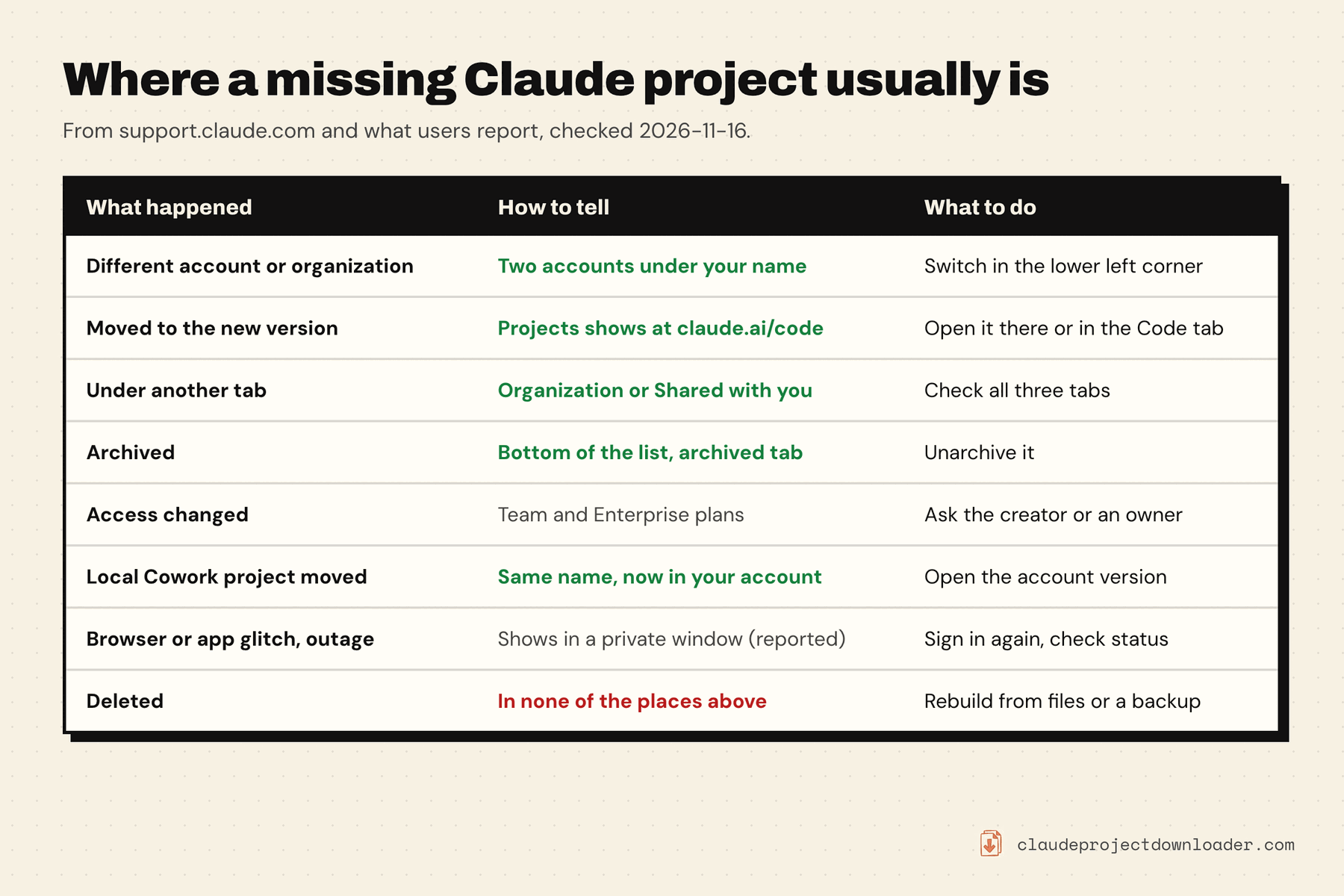
1. You're in a different account. Anthropic's account migration page says "Claude keeps your chats and projects under the email address you log in with". Two things follow. If you have a personal account and an organization account on the same address, each has "its separate chats and projects", and you switch "by clicking your initials or name in the lower left corner". A blue checkmark shows the one you're in. And if you signed in with a different address than usual (a work email instead of Gmail, or an Apple Hide My Email address), you're in another account altogether, and it will look empty.
2. The project moved to the new version of projects. Anthropic's projects page says it has "started moving existing projects for some Pro, Max, and Ultra users to the new version". A moved project isn't on the chat side any more. It's under Projects in the sidebar at claude.ai/code and in the Code tab of the Claude desktop app, and the Claude Code docs add that the entry can sit under More. Anthropic is clear about the contents: "Nothing is lost or deleted in the move. Everything in your project comes with it: your instructions, files, full chat history, and scheduled tasks." If you used the project in the last 30 days, Anthropic says it emails you first, so search your inbox too. The move is one-way: see whether you can switch back to classic below.
3. It's under another tab. The Projects page has three tabs. Per Anthropic's project management page, "Your projects" lists the ones you created, "Organization" lists projects shared with your whole organization, and "Shared with you" holds the rest. Its advice: "If you can't find a project, check all three tabs."
4. It was archived. Archiving takes a project out of the main list without deleting anything. Anthropic says archived projects "appear at the bottom of your main projects list", and there's an archived projects tab on the Projects page. Open the project's ⋯ menu and choose Unarchive. The archive matters for the new version too: if you set it up yourself, the Claude Code docs say the Get started button has you "upgrade or archive the existing claude.ai projects it lists".
5. Your access changed. This one is for Team and Enterprise plans. A project's creator can remove you from a private project, and then, in Anthropic's words, you "will no longer be able to access this project or its content". If the creator was removed from the organization, a private project goes with them: "other members of the organization will not be able to access it". Projects they shared stay visible. If you were the one removed and you're added back with the same email, Anthropic says "previous chats, projects, and skills will be restored".
6. It was a Cowork project made from a folder. Claude Desktop now moves these into your Claude account. Anthropic's Cowork projects page says the name, description and instructions move, the folders and files stay on your computer, and "After the move, the original local project no longer appears in your projects list." Look for a project with the same name in your account.
7. The browser, the app, or Claude itself is having a bad day. When every project and chat vanishes at once, suspect the session before the data. In a long r/ClaudeAI thread about exactly this, one person got everything back by signing in from a private window, another by opening the desktop app, and several found they were in the wrong account or organization. A bug report describes projects missing from the desktop app's sidebar while they were still on claude.ai in a browser. These are user reports. For a real outage, check status.claude.com.
8. It was deleted. Deleting takes a click on Delete and a second on "Yes, delete", so it's rarely an accident. See the section on deleted projects below.
One more for people who stopped paying. Anthropic says Free accounts "can create a maximum of five projects". Its pages don't say what happens to the others when a paid plan ends. A commenter in the Reddit thread above says that after their Max plan lapsed, most of their projects were out of reach. If that's your situation, ask Anthropic support before you delete anything to make room.
Find a missing Claude project, step by step
- Check the account. Click your initials or name in the lower left corner. If two accounts are listed, switch to the other one. If only one is, confirm the email address is the one you created the project with.
- Open claude.ai/projects and check all three tabs. Then scroll to the bottom of the list and open the archived projects.
- Open claude.ai/code and look for Projects in the sidebar, directly or under More. If it's there, your project may have moved. Search your email for a notice from Anthropic about it.
- Try a private window. Sign in and look again. If the projects are there, the problem is on your side: sign out and back in in your normal window, then switch off extensions one at a time.
- Try another surface. If you were in the desktop app, open claude.ai in a browser. If you were in the browser, open the app.
- Check status.claude.com. During an incident, wait. Don't start rebuilding.
- On a Team or Enterprise plan, ask. The project's creator or an organization owner can see whether your access was removed and add you back.
- Still nothing? Write to Anthropic support from the email address on the account, with the project's name and when you last opened it.
Don't recreate the project until you've done steps 1 to 3. A rebuilt project starts with no chat history.
The project is there, but its chats are missing
Sometimes the project opens and looks empty. A few things can cause that:
- The chats were moved out. Claude lets you remove a chat from a project or move it to another one from the chat's own menu. Moved chats are in your main chat list, so search there by title.
- The chats were deleted. Anthropic's deletion page says a deleted conversation is "removed from your conversation history immediately and deleted from our back-end systems within 30 days".
- The project switched to the new version. There a project is one ongoing conversation with threads, not a list of separate chats, so it looks very different. Anthropic says the full chat history comes along.
- They were Cowork tasks. Anthropic's page on the combined chat and Cowork experience says search "doesn't include older Cowork tasks", and that you can still find them "by name in Recents". An open bug report from September 2026 describes Cowork projects dropping out of the list while their conversations stayed, ungrouped.
Can you switch Claude projects back to classic?
No. As of 20 November 2026, Claude has no setting that turns a project on the new version (Projects beta) back into a classic project, and neither Anthropic's help pages nor the Claude Code docs describe a way to opt out or undo the move. People who went looking report no downgrade option in the project's settings. An open bug report from October 2026 puts it this way: "There is no setting to opt out, revert, or keep classic projects." It has no reply from Anthropic so far, and an earlier request to document whether the upgrade can be reverted was closed as "not planned".
What you can still do:
- Look for the earlier version in your archive. Anthropic's account migration page describes a switched project's earlier version as "an archived project with the chats from before the switch". Users in an r/ClaudeAI thread report the same: the old project, with its separate chats, sitting among the archived projects at claude.ai/projects. Treat it as a record of where things stood. Anthropic doesn't say that unarchiving it gives you a working classic project again.
- Ask the new version to behave more like the old one. The Claude Code docs list things you can tell Claude in the project conversation, such as "Answer that here instead of starting a thread", "Propose threads and wait for my go-ahead before starting them" and "Reuse an existing thread for follow-ups in the same area". That cuts down the threads. It doesn't bring back a list of separate chats: the docs say a thread can't be moved out of its project "to stand alone".
- Tell Anthropic. Add your case to the open bug report, or write to Anthropic support. Neither is a fix, but it's the only route to one.
If your projects haven't moved yet, you have more room:
- Don't start the switch yourself by accident. At claude.ai/code, the Get started button on the Projects page has you "upgrade or archive the existing claude.ai projects it lists". One Reddit poster pressed a "Migrate to Projects Beta" banner expecting it to change only Claude Code, and found the project had changed in chat too. Since there's no way back, decide first.
- Watch for Anthropic's email. Anthropic says projects it hasn't moved "stay on the current version for now, and we'll move them as the rollout expands", and that it emails you before moving a project you used in the last 30 days. It names no date and no way to decline. Team and Enterprise projects aren't being moved yet.
- Save a full copy while the project is still classic. A classic project exports with its instructions, knowledge files and separate chats. The backup section below has the free routes and ours.
Can you recover a deleted Claude project?
Not from inside Claude, as far as Anthropic documents. For projects in the new version, the Claude Code docs say deleting "permanently removes the project along with its threads, its memory, and its files" and "This can't be undone." For classic projects, the help page describes the delete steps and no way to restore. Archived projects can't be deleted at all until you unarchive them, which is a good reason to archive when you're unsure.
What may still exist somewhere else:
- Your original files. Anything you uploaded as project knowledge came from your computer, your cloud drive or your email. Search there by file name.
- An earlier export. If you ran Settings → Privacy → Export data before the project was deleted, that ZIP has your conversation data. A new export won't include what's already deleted.
- A colleague's copy. If the project was shared, someone may have duplicated it or saved its files.
- Your organization's export. On Team and Enterprise plans, Anthropic says the Primary Owner "can also always export the member's project data and chats", subject to the organization's retention settings.
Projects live on Anthropic's servers, not on your disk. File-recovery software can only find things once saved on your computer, such as the originals you uploaded.
Back up a project once you've found it
A scare like this is a good moment to make a copy, so the next time Claude projects disappeared from your list you'd lose nothing. The free routes first:
- Run Anthropic's export. Settings → Privacy → Export data emails you your conversation data as JSON. Anthropic's export page says the link expires after 24 hours and that the export leaves out the files you uploaded.
- Copy the instructions. Paste the project's instructions into a text file. It's the part you can't get back from anywhere else.
Those cover chats and instructions but not a project as a set of files. Claude Project Downloader is a Chrome extension we make for that. Open a project, click the extension icon and press Download Entire Project. You get one ZIP with instructions.md, the knowledge files and the project's chats as Markdown or JSON. The free plan includes one full-project export in total. Pro makes it unlimited and adds Back up everything, which saves every project and chat to a ZIP in your Downloads folder, on demand or on a daily or weekly schedule.
What it can't do:
- It can't find or restore a missing project. It reads the projects your signed-in account can open, in Chrome on a computer. If a project isn't in your list, the extension won't see it either.
- New-version projects come out differently. On a project at claude.ai/code, Download Entire Project saves the conversation, the thread sessions and the Library files, but not the instructions. Copy those by hand from the project's settings.
How to back up Claude projects and chats compares every route, including a free command-line tool.
Frequently asked questions
Why have my Claude projects disappeared?
Most often you're signed in to a different account or organization, the project was archived, it's under another tab of the Projects page, or Anthropic moved it to the new version of projects at claude.ai/code. A browser or app glitch can also hide everything for a while. Anthropic says project data is kept until you delete it or delete your account.
Where did my Claude projects go after the update?
If Anthropic moved your project to the new version of projects, it now opens from Projects in the sidebar at claude.ai/code and in the Code tab of the desktop app, sometimes under More. Anthropic says nothing is lost or deleted in the move: instructions, files, full chat history and scheduled tasks come along.
Can I switch Claude projects back to the classic version?
No. As of November 2026 Claude has no setting that turns a project on the new version (Projects beta) back into a classic project, and Anthropic's pages describe no way to opt out. Check your archived projects for the earlier version with its chats from before the switch, and save a full copy of your own projects that haven't moved yet.
How do I find archived Claude projects?
Open claude.ai/projects. Archived projects appear at the bottom of the main projects list and in the archived projects tab. Open the project's three-dot menu and choose Unarchive to bring it back. Members, sharing settings and project knowledge are kept while a project is archived.
Can I recover a deleted Claude project?
Anthropic's pages describe no way to restore one, and for new-version projects the Claude Code docs say deletion can't be undone. You can rebuild from your original files, an export you made earlier, a colleague's copy, or on Team and Enterprise plans the Primary Owner's organization export.
Does Claude delete old or inactive projects?
Anthropic's pages don't describe an inactivity limit for projects. Its deletion page says data associated with your account, like your projects, is kept until you delete it or delete your account. Enterprise organizations can set their own retention rules, so ask an owner if you're on one.
Why are my projects missing in the Claude desktop app but not on the web?
The desktop app and claude.ai show the same account, so first check you're signed in to the same account and organization in both. Users have also reported the app's sidebar losing projects after a reinstall or update while they stayed available on claude.ai. If they're on the web, nothing is lost; update the app and sign in again.