Claude Project Downloader in Brave, Opera and Vivaldi
 By Aarohan Niraula3 min read
Install Claude Project Downloader in Brave, Opera or Vivaldi from the Chrome Web Store, plus the one Brave setting that Export everything needs.
Claude Project Downloader in Brave works the same way it does in Chrome: install it from the Chrome Web Store, open claude.ai, and export the projects and chats your own account can already open. One feature needs a change first. Brave switches off the folder picker that Export everything uses, so turn on brave://flags/#file-system-access-api and relaunch Brave before you start it. Opera and Vivaldi install it from the same Chrome Web Store page.
Install Claude Project Downloader in Brave
- Open the Claude Project Downloader page on the Chrome Web Store in Brave.
- Click Add to Brave, then Add extension.
- Open claude.ai and sign in, if you aren't already.
- Click the extension's icon in the toolbar (pin it from the puzzle-piece menu so it stays there). The side panel opens on the right.
That's the whole setup. The extension uses the Claude login you already have in that browser, and it asks for no account or API key. Exporting a chat as Markdown, JSON or PDF, downloading a project as one ZIP and running backups all work in Brave exactly as they do in Chrome. The guide to exporting Claude chats walks through each of them.
Export everything in Brave: turn on one flag
Export everything saves your whole Claude account (every chat, project, file, memory and style) straight into a folder on your computer. It writes one file at a time, so memory stays flat however big the account is. To do that, it asks the browser to open a folder picker. Chrome and Edge have one. Brave ships it switched off.
On 21 November 2026 a customer on Brave pressed Export everything, picked a folder, and got "Chrome couldn't open that folder." Nothing was wrong with the folder. Brave hadn't let the picker open at all. This fixed it for them:
- Paste
brave://flags/#file-system-access-apiinto Brave's address bar. You have to paste it: web pages can't link tobrave://addresses. - Next to File System Access API, change Default (Disabled) to Enabled.
- Click Relaunch at the bottom of the page.
- Open the extension and press Export everything again.
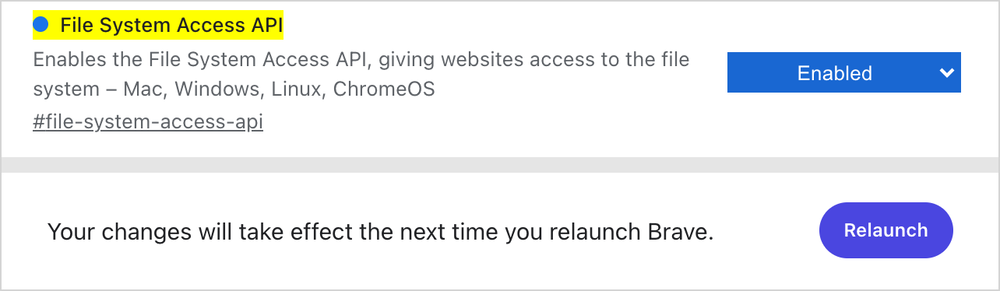
We checked this ourselves in Brave 1.92 (Chromium 150) on a fresh profile. With the default settings, the folder picker function (showDirectoryPicker) doesn't exist on any page. With the File System Access API turned on, it's there and opens the normal system dialog.
What the flag does, honestly
Brave's own description says it enables the File System Access API, "giving websites access to the file system." In practice it lets a website or extension ask to open a file or folder. You still choose the folder in your system's dialog, and the browser asks before anything is written to it. A Brave developer confirmed in Brave's issue tracker that the support is there and "just disabled by default".
The switch is browser-wide, not just for this extension. If you'd rather keep it off, turn it back to Default once your export is finished. Turn it on again if you want to continue a stopped export into the same folder later.
Without the flag, Claude Project Downloader in Brave can still get everything out: download each project as a ZIP, or run a backup, which saves a ZIP to your Downloads folder. The backup guide covers both.
Opera, Vivaldi and Arc
Opera. Open the Chrome Web Store page and click Add to Opera. Opera's help page says older versions need its Install Chrome Extensions add-on first; recent versions install Chrome Web Store extensions without it. Opera has no working Chrome side panel, so the extension opens as a pop-up when you click its icon, with the same export buttons.
Vivaldi. Click Add to Vivaldi on the Chrome Web Store page. If you don't see that button, Vivaldi's extensions help says to turn on Web Store under Settings, Privacy and Security, Google Extensions. Vivaldi shows extension side panels in its own panel area. If something in the extension looks wrong there, tell us at support and we'll look.
Arc. Arc installs Chrome Web Store extensions, but it doesn't show extension side panels, and that's where this extension's main screen lives, so clicking its icon won't open it. Use Chrome, Brave or Edge for exports.
Microsoft Edge has its own listing on Edge Add-ons. It can be a few releases behind the Chrome Web Store one, so a feature described here may reach Edge later.
Firefox, Safari and phone browsers can't run it. That includes Brave on Android and iOS.
Frequently asked questions
Does Claude Project Downloader work in Brave?
Yes. Install it from the Chrome Web Store page with Add to Brave. Exports and backups work as in Chrome. Export everything also needs brave://flags/#file-system-access-api set to Enabled and a relaunch, because Brave ships the folder picker switched off.
Why does Export everything say Chrome couldn't open that folder in Brave?
Brave keeps the File System Access API off by default, so the folder picker never opens. Paste brave://flags/#file-system-access-api into the address bar, set it to Enabled, relaunch Brave and try again.
Is it safe to turn on the File System Access API in Brave?
It lets sites and extensions ask to open a file or folder. You still pick the folder yourself, and the browser asks before anything is written. It applies to every site, so you can set it back to Default when your export is done.
Does it work in Opera, Vivaldi or Arc?
Opera and Vivaldi install it from the Chrome Web Store. In Opera it opens as a pop-up instead of a side panel. Arc installs it but doesn't show extension side panels, so the main screen never opens there.